
A new leads campaign in Meta Ads Manager is built to find the cheapest form submissions it can. A roofer, plumber, or HVAC company needs something narrower: homeowners inside a drive radius who will pick up the phone and book. The gap between those two goals lives in a handful of default settings.
This guide walks through every screen of a home service lead campaign with screenshots taken in Ads Manager in September 2026. It shows which defaults are switched on, what Meta says each one does, and how to set up the campaign so you control where the budget goes. Then it covers audience and creative testing, an AI prompt for writing ads from real research, and a calculator to budget the whole thing.
How we sourced this. Every claim about how a setting works links to Meta's own help center. Every screenshot is from a real ad account with private details covered in gray. Nothing was published and no money was spent to capture them. Ads Manager changes often, so your labels may differ slightly.
Cheap leads vs booked jobs
Meta is open about what its automation optimizes for. Its help page on Advantage+ audience says the setting could get lower cost per result, about 9.7% for traffic, engagement, and leads campaigns, and it recommends testing it for most campaign types. For Advantage+ leads campaigns, Meta reports that in early testing they delivered on average 14% lower cost per lead and 10% lower cost per qualified lead.
Those are real numbers, and for many advertisers the automation is the right choice. The catch for local service businesses is that a result is a form submission. The system has no idea that the renter who tapped your ad cannot approve a roof, or that the person 40 miles away is outside the area your trucks cover, unless you tell it through settings or through data you send back.
Here are the defaults we found in a brand new leads campaign, and what we change for home services:
| Setting | Default we saw | For home services |
|---|---|---|
| Audience | Advantage+ audience, with age, gender, and interests as suggestions | Specific audience |
| Location expansion | "Reach more people likely to respond" checked | Unchecked |
| City radius | +25 mi around a city (our Dallas test) | Your real service radius |
| Conversion location | Website and instant forms | Instant forms (or test website separately) |
| Form optimization | Flexible form delivery on, Optimized | Off, or Manual |
| Ad format | Multi-advertiser ads checked | Your call, test it |
Step 1: Special Ad Category check
Start with the Special Ad Category, because it limits almost every setting that follows. Meta requires a category for ads about housing, employment, financial products and services, and social issues, elections, or politics.
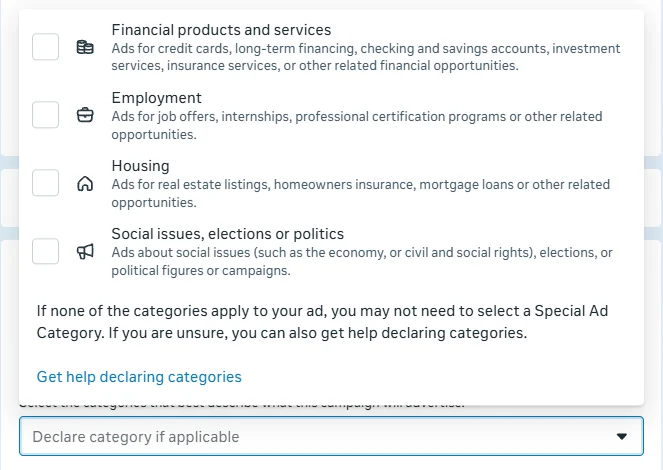
According to Meta's housing ads guidance, a housing ad promotes or directly links to a housing opportunity or related service. Its examples include listings for sale or rent, homeowners and renters insurance, mortgage loans and financing, home equity and appraisal services, and real estate services. Hotels and general homeownership tips are listed as not housing.
Home repair, roofing, HVAC, and plumbing are not in those examples, and Ads Manager itself notes that you may not need a category if none apply. Two cautions before you skip it:
- Meta says its examples are not comprehensive and do not constitute legal advice.
- An ad built around financing, such as monthly payments on a new system, may fall under the financial products and services category, which Meta made required on January 21, 2025.
If a category applies, Meta's Special Ad Category audience rules remove zip code targeting and location exclusions, expand any radius to at least 15 miles in the US and Canada, require ages 18 to 65+ and all genders, and limit detailed targeting. Much of the audience work later in this guide would not be available, so decide this first.
Step 2: Leads campaign and budget
Create a campaign with the Leads objective. A new campaign opens in Meta's recommended setup, which it calls an Advantage+ leads campaign. Meta's page on what turns Advantage+ on and off explains that new campaigns start with a score of 100, and that budget, audience, and placement choices each move it.
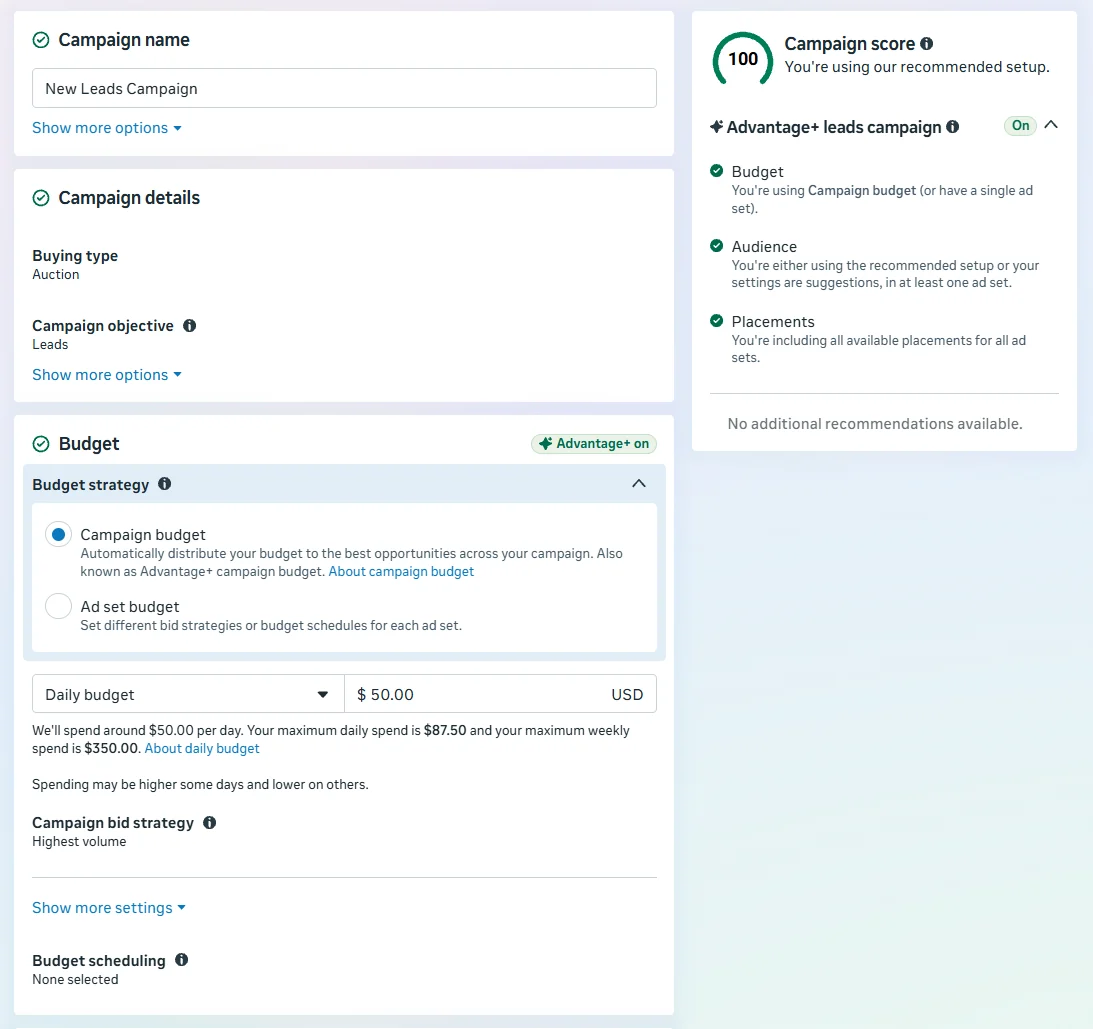
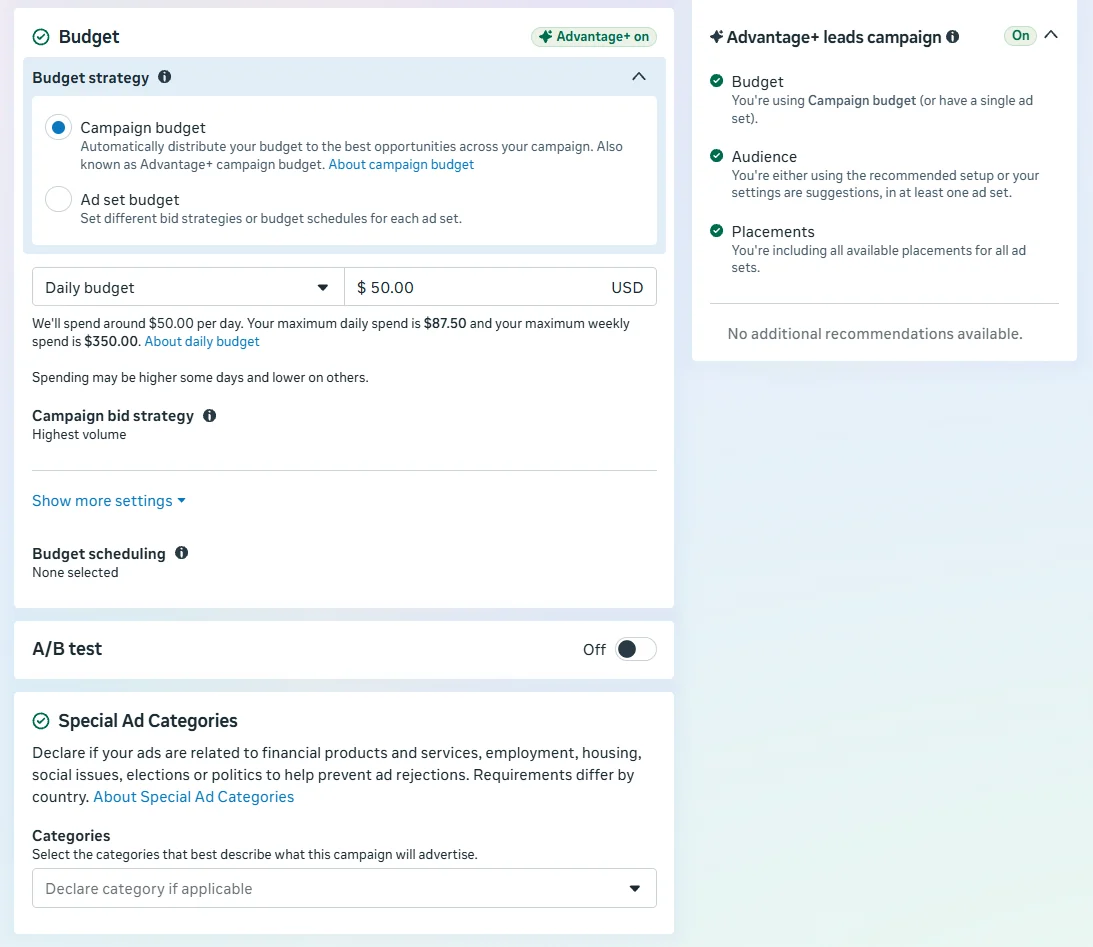
Budget strategy. Campaign budget lets Meta shift spend between ad sets. Ad set budget fixes spend per ad set. When we entered a $50 daily campaign budget, Ads Manager showed a maximum daily spend of $87.50 and a maximum weekly spend of $350, so expect some days to run over the daily number while the week stays capped.
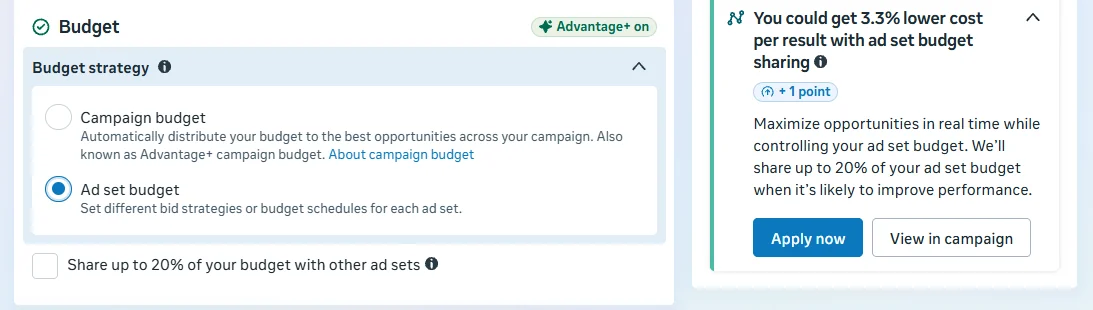
For one service area, a single ad set with either budget type works. When you run separate service zones or brands that each need guaranteed spend, ad set budgets keep one area from starving another. Bid strategy defaults to Highest volume, which is the sensible starting point until you have enough data to set a cost target.
Step 3: Conversion location and performance goal
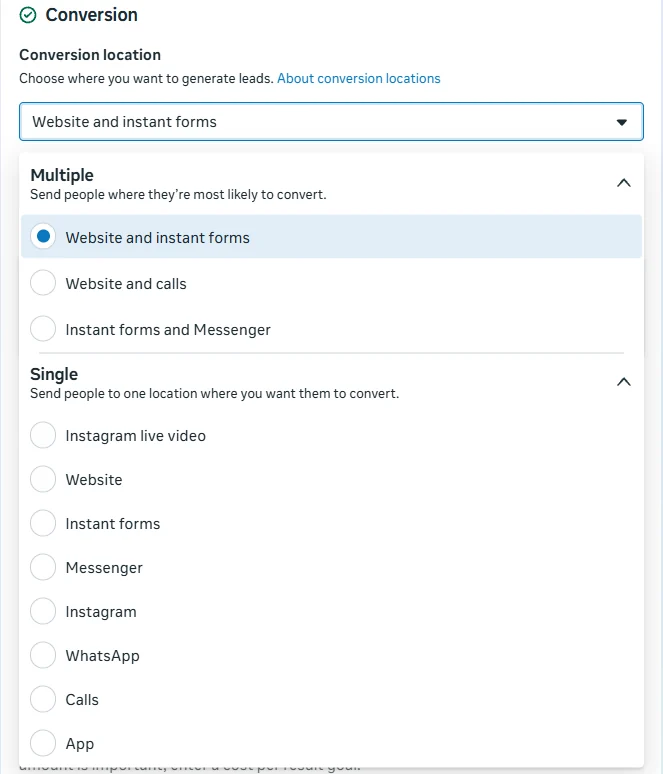
At the ad set, the conversion location defaulted to Website and instant forms, which lets Meta choose where each person converts. For a clean read on lead quality, pick one. This guide uses Instant forms.
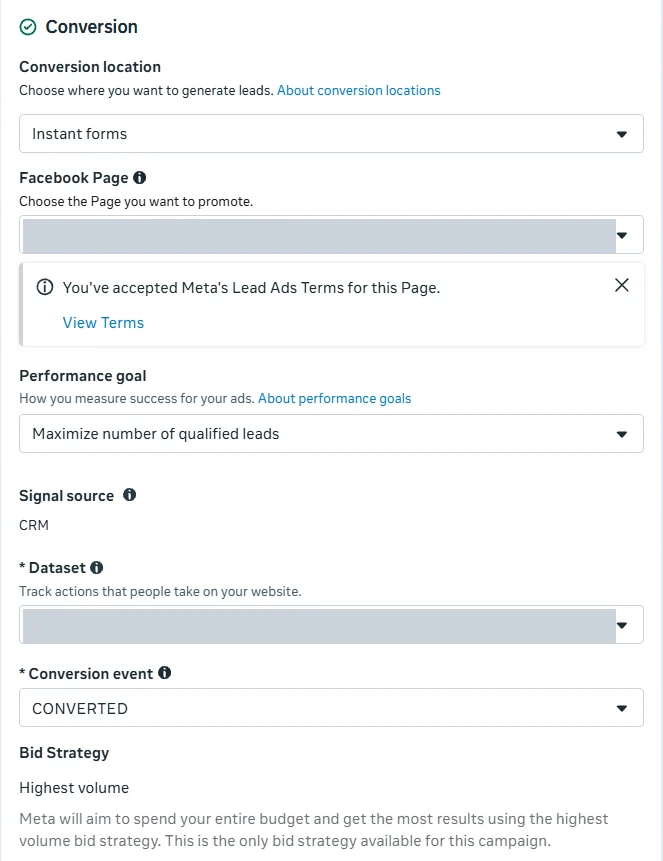
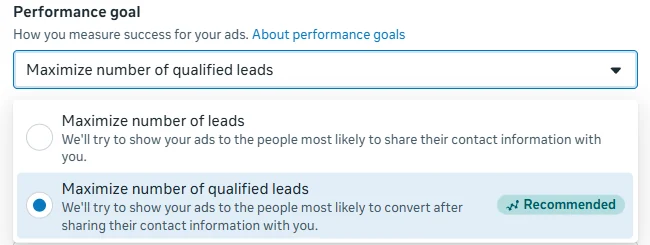
Maximize number of qualified leadsis labeled Recommended, and it is the better goal for contractors, because it optimizes toward the leads your CRM marks as qualified instead of any submission. It needs that CRM data. Meta's performance goal documentation says that beginning April 2026 the qualified leads goal is no longer available for new campaigns without a Conversions API integration, and existing campaigns are affected beginning August 2026. Meta also reports that advertisers using the Conversions API for CRM with this goal saw 21% lower cost per quality lead on instant forms.
If your CRM is on Meta's list of CRM partner integrations, connecting it is usually the fastest route. Otherwise your developer can follow the conversion leads integration guide. Until it is connected, start with Maximize number of leads and let the form do the filtering described in Step 8.
What Advantage+ audience actually does
This is the setting most home service advertisers misunderstand. With Advantage+ audience on, the audience section splits into two kinds of input.
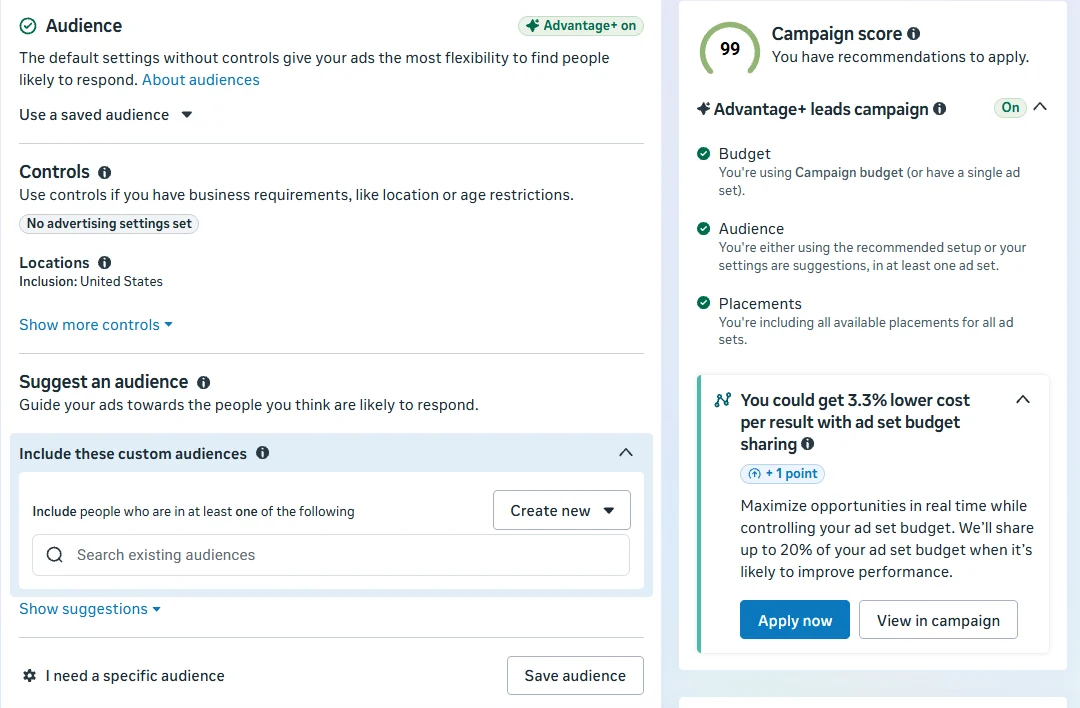
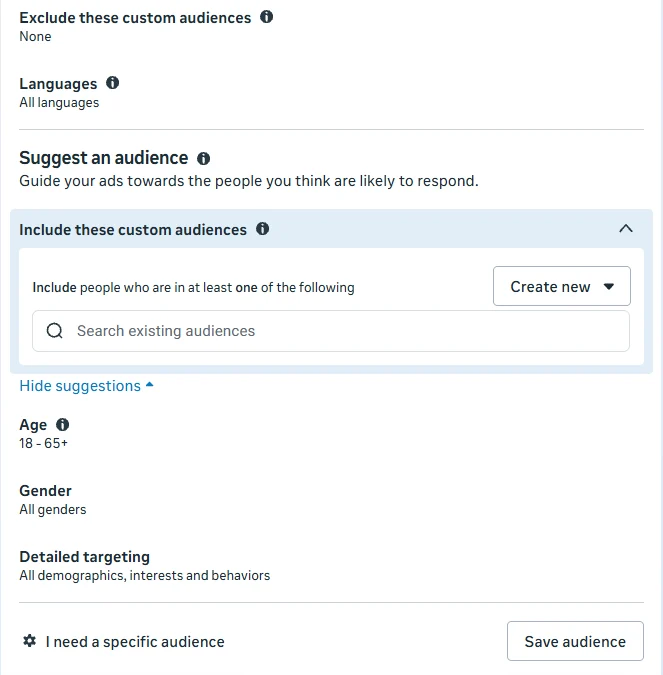
Meta's page on audience controls and suggestions defines them:
- Controls are hard limits: locations, minimum age, excluded custom audiences, and languages.
- Suggestionsare age, gender, detailed targeting, and included custom audiences. In Meta's words, suggestions don't always constrain your audience.
So when a roofer enters ages 35 to 65 and interests like home improvement as suggestions, Meta may still deliver to a 22 year old with no interest in either if its model predicts a form submission. The location control still holds, which is why the location settings in Step 5 matter so much.
Meta's own guidance points to where a specific audience makes sense. When we clicked to use a specific audience, the dialog said to only use one when some people shouldn't see your ads, for example because of legal, geographic or business restrictions. A service radius is a geographic and business restriction.
Step 4: Switch to a specific audience
In the audience section, choose I need a specific audience. Ads Manager opens a dialog with three choices.
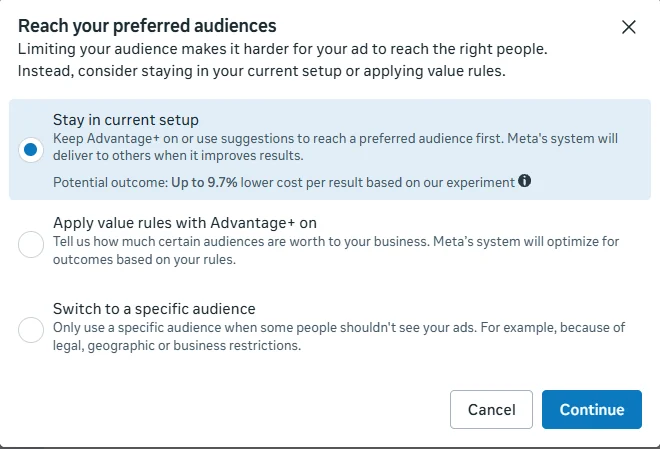
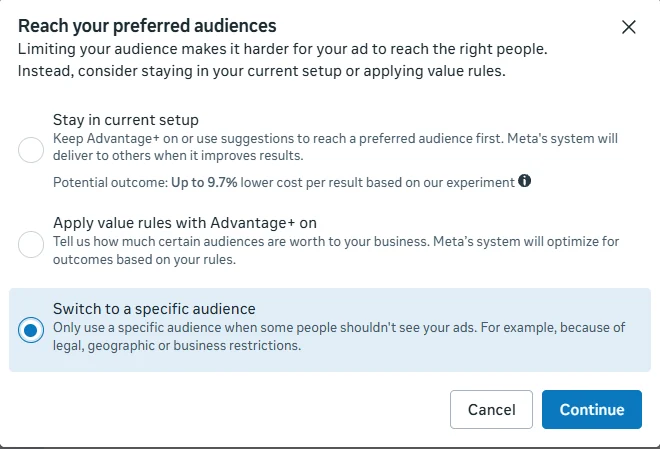
The middle option, value rules, keeps Advantage+ on while letting you tell Meta which people are worth more to you. It is worth testing later, but it still lets delivery go to anyone. Meta's help center describes the same switch as choosing to reach a limited audience with Use as a suggestion unchecked. It also notes that setting a minimum age or excluding custom audiences on their own does not turn Advantage+ audience off.
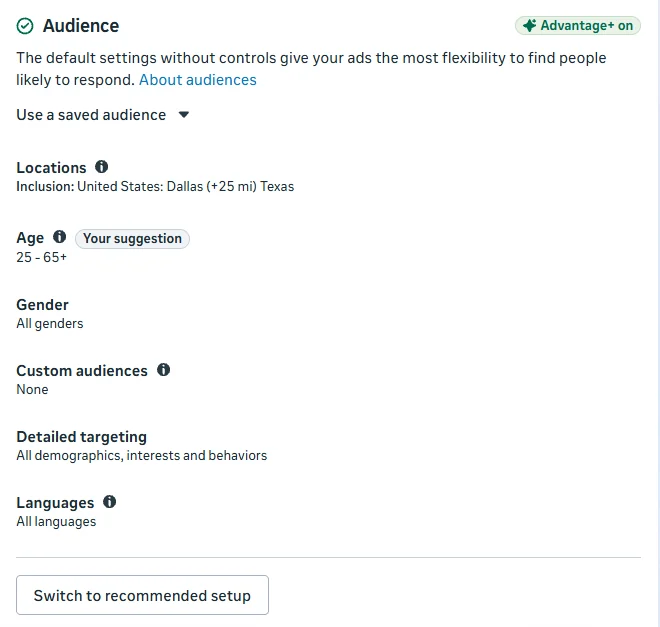
Set age and gender to reflect the people who hire you, or leave them broad and let the form qualify. For most trades, broad age with a homeowner question in the form is the cleaner test. If you use detailed targeting, check whether Advantage+ detailed targeting is shown for the ad set. Meta's detailed targeting expansion page says it can reach people beyond your selected interests, does not change location, age, or gender, and still respects exclusions.
Step 5: Lock the service area
This is the single most important setting in this guide. When we added Dallas, Texas as a location, Ads Manager applied a 25 mile radius and checked a box labeled Reach more people likely to respond by default.
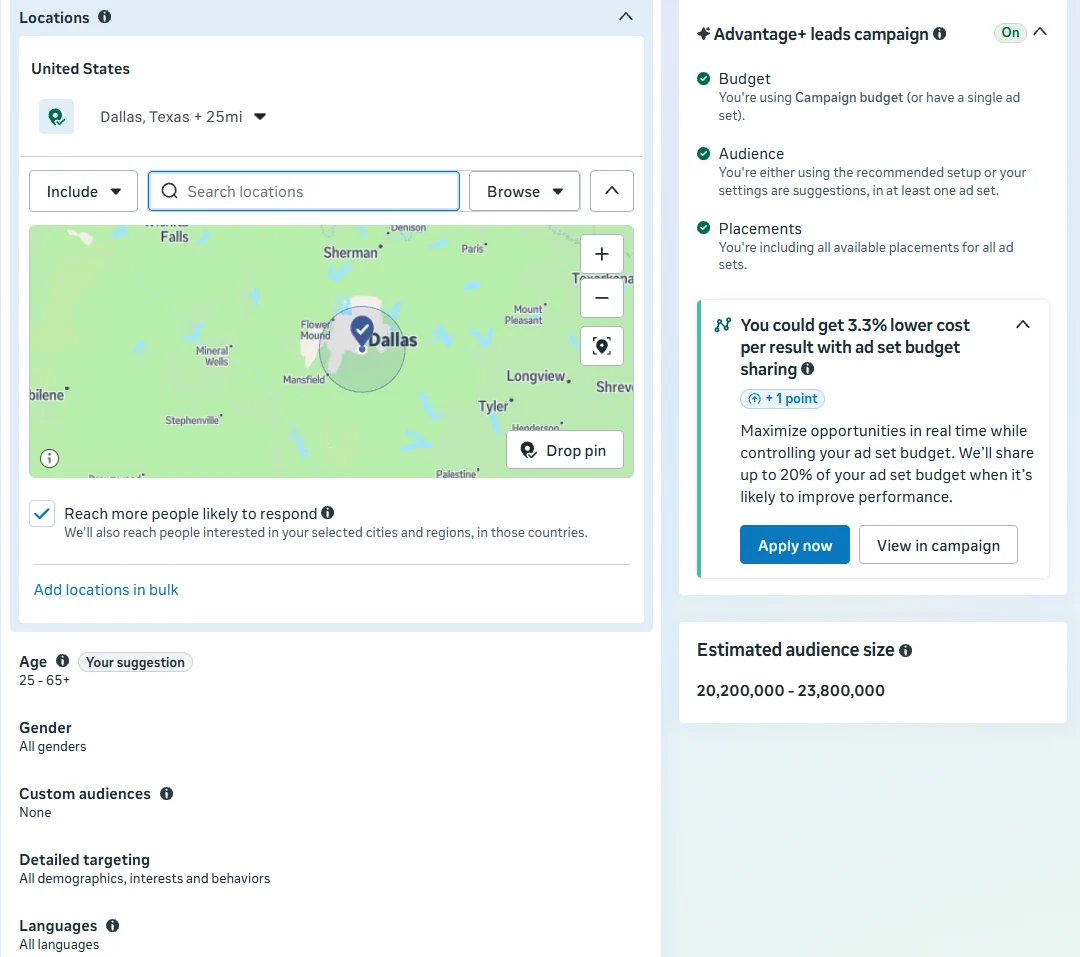
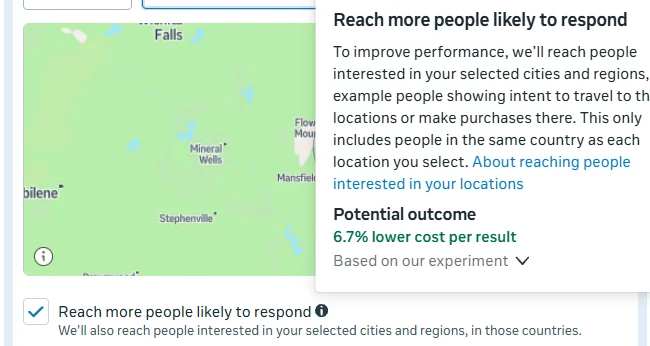
For a hotel or a restaurant, people planning a trip to Dallas are valuable. For a company that installs water heaters, they are not. Here is the same location with the box unchecked:
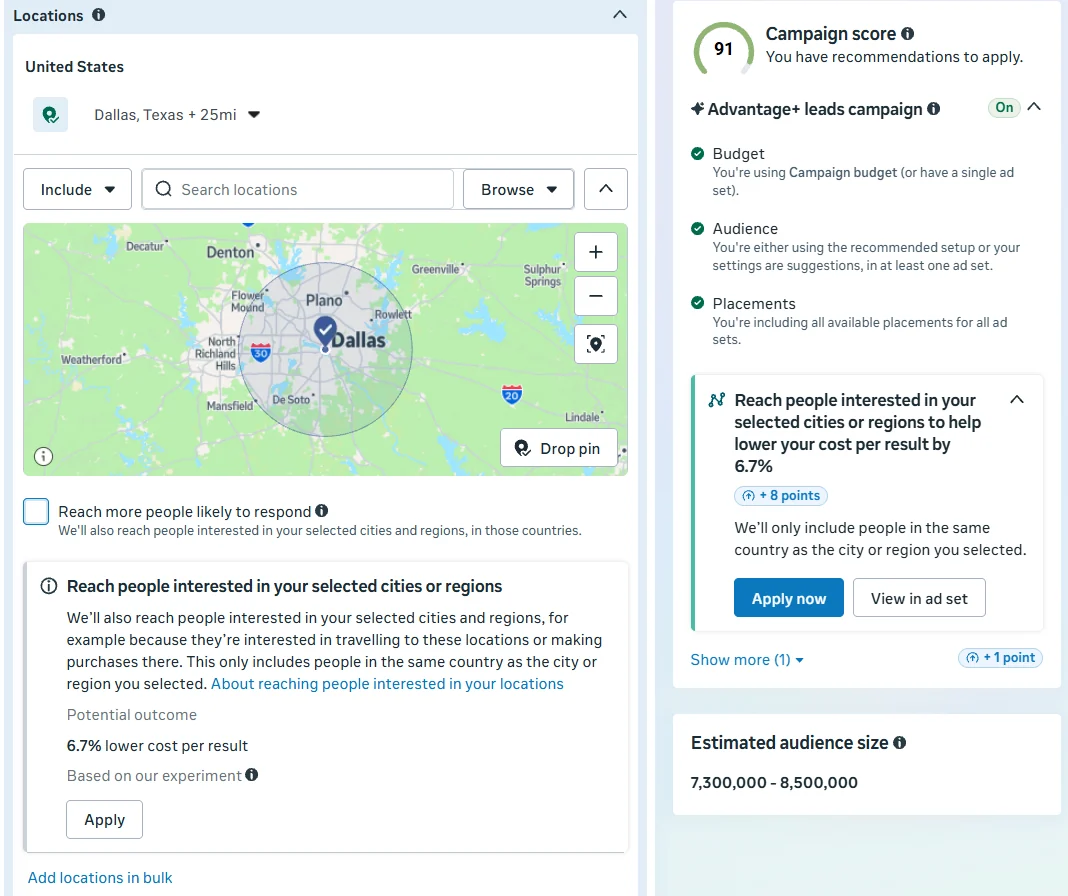
The estimate fell by roughly two thirds, which gives a sense of how much of the default audience came from interest in the location rather than presence in it. Leave it unchecked and ignore the Apply now prompt.
- Set the radius to your real drive time, not the Ads Manager default. You can drop a pin on your shop or add several cities with smaller radii.
- Exclude areas you do not serve if a radius crosses into them, unless a Special Ad Category removed that option.
If you are also working on showing up in the map pack for the same area, the service area thinking in how proximity affects Google Maps rankings applies here too.
Step 6: Placements
Placements defaulted to Advantage+ placements, delivering across Facebook, Instagram, and Audience Network on all devices.
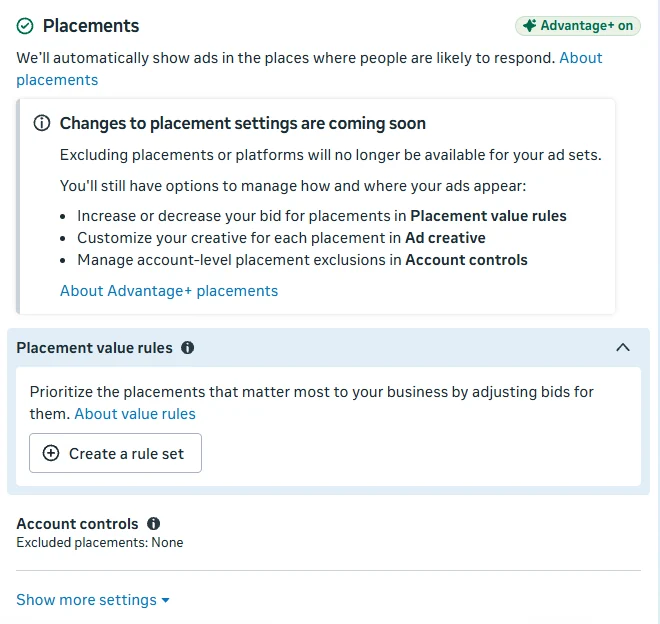
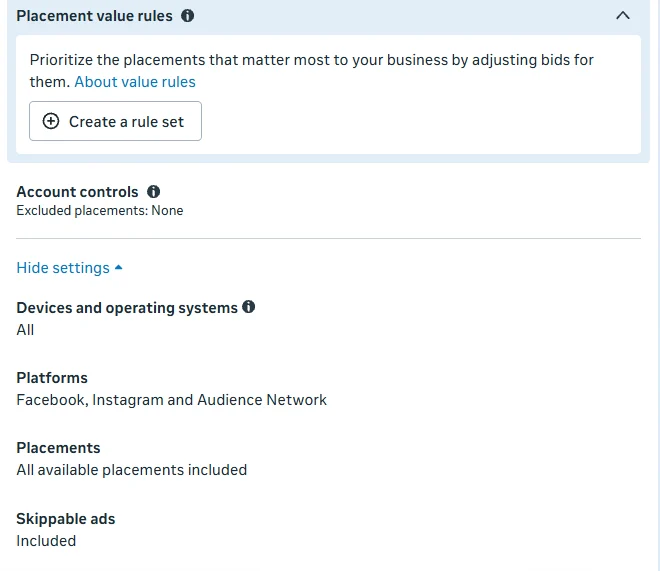
In our account there was no manual placement option at the ad set, and Meta's notice says exclusions are going away. The alternatives it lists are placement value rules, placement-specific creative, and account-level exclusions in Account controls. Meta's Advantage+ placements page has the current details.
For home services, the practical lever is the form type. Meta's instant form types page says a Higher intent form delivers only to the mobile Facebook Feed and Instagram feed, which removes placements where accidental taps are more likely without touching placement settings. Step 8 sets that up.
Facebook Ads management
Leads your office can actually book
We build home service campaigns around service radius, qualifying forms, and CRM feedback, then report on booked appointments instead of form fills.
Explore Facebook Ads managementStep 7: The ad and its defaults
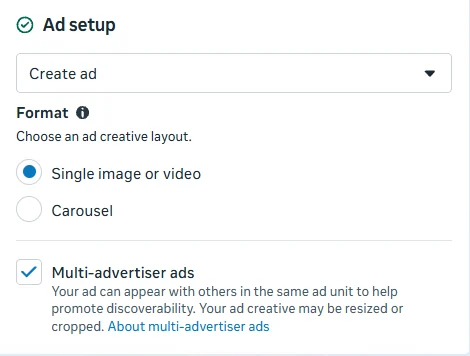
Multi-advertiser adswas checked by default. Its description says your ad can appear with others in the same ad unit and may be resized or cropped. That can mean your ad showing next to a competitor's. There is no published data on how it affects home service leads specifically, so either uncheck it or keep it on in one variant of a test and compare.
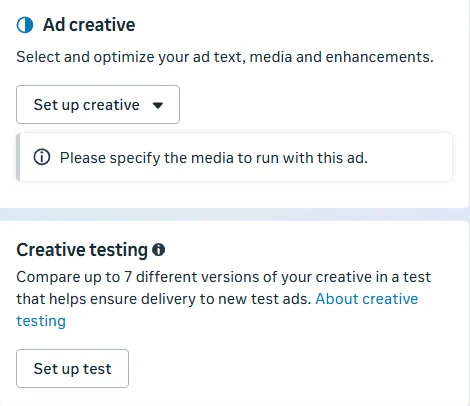
Creative enhancements are the other default to review. Meta's creative enhancements page says some are on by default and can change how your image, video, or text is shown. They are switched off in the ad creative section under Enhancements, and some only appear in the advanced preview. If your ad relies on exact wording, like a license number or an offer, review each one.
Step 8: An instant form that filters
The form is where lead quality is won or lost. Instant forms prefill a person's contact details, which is why they convert well, and also why people submit without much thought. Choose Create instant form, then build your own.
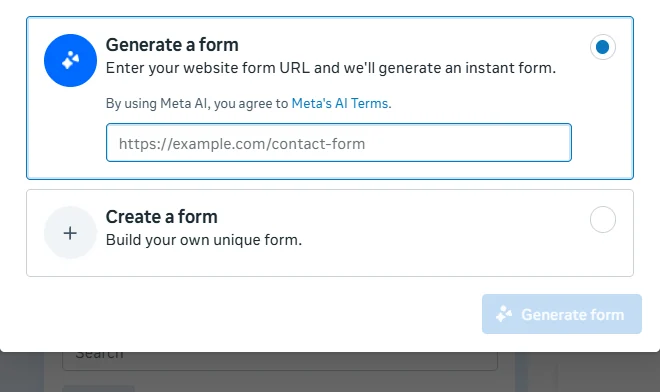
Form type: Higher intent with phone verification
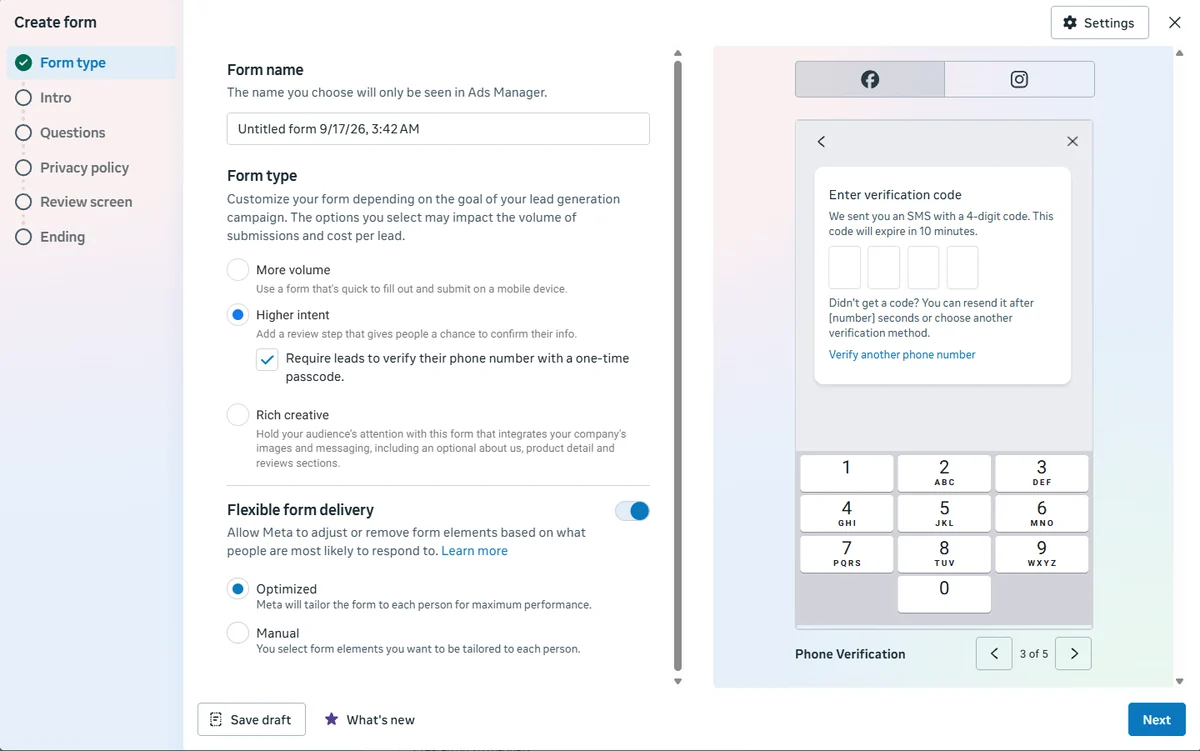
Meta lists three form types: More volume, which is quick to fill out, Higher intent, which adds a review step, and Rich creative. For a contractor, the phone number is the lead. A verified number means your office is not calling disconnected lines.
In the same screen, look at Flexible form delivery. In our builder it was on with Optimized selected, which Ads Manager describes as allowing Meta to adjust or remove form elements based on what people are most likely to respond to. With Manual, you choose which form elements can be tailored. If your qualifying questions are the point of the form, turn the toggle off, or choose Manual and leave those questions out of what Meta can change.
Questions: the homeowner filter
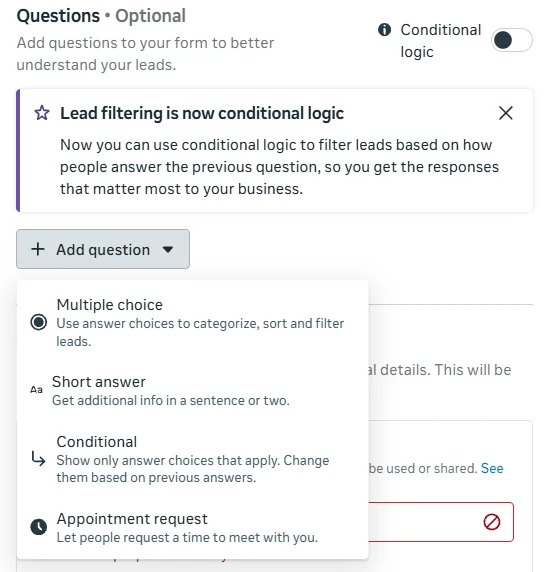
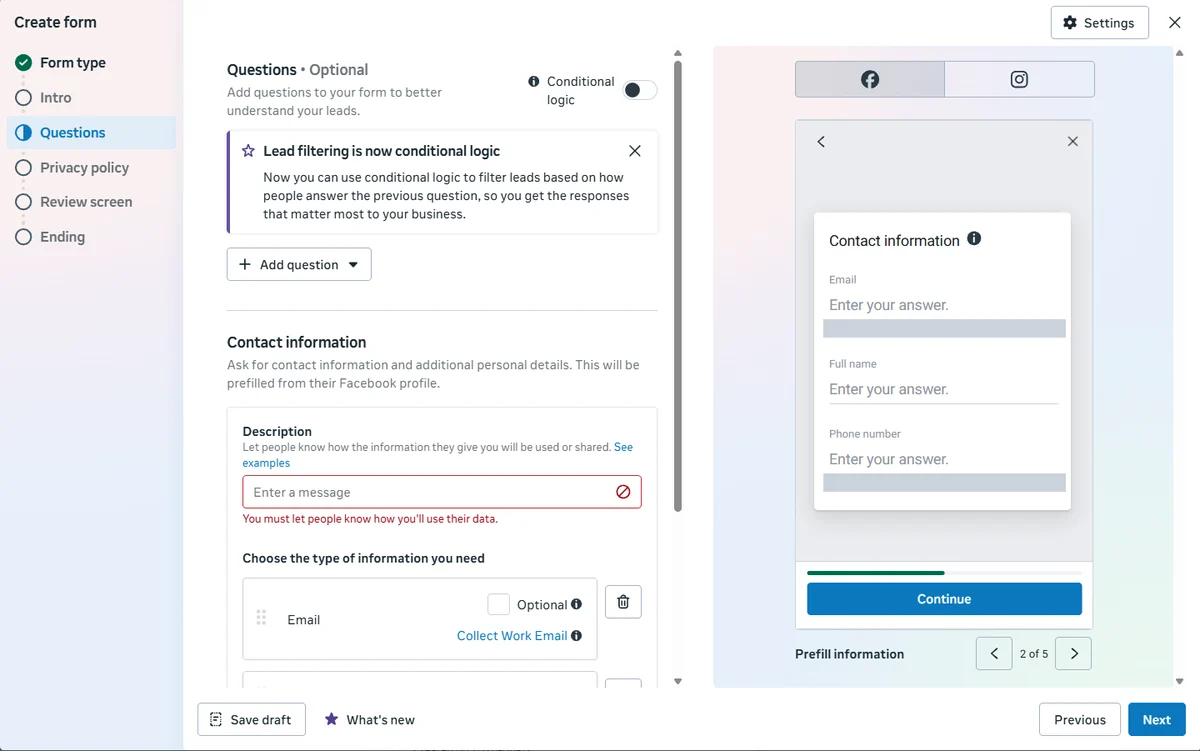
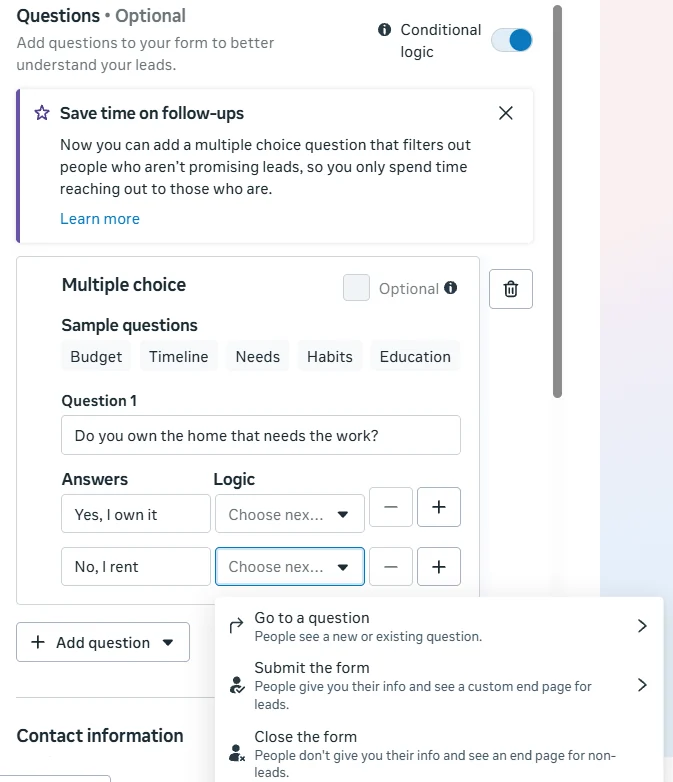
Meta's conditional logic documentation confirms how routing works: each answer can go to another question, submit the form, or close the form, and a form needs at least one path to Submit and one to Close. People who reach Close are not delivered to you as leads. Meta also warns that conditional logic may increase your cost per lead, which is the trade you want if it removes leads that were never going to book.
A simple structure for most trades:
- Do you own the home that needs the work? Yes goes to question 2. No, I rent goes to Close the form, unless you also serve landlords or property managers.
- What do you need help with? Your real service list. A service you do not offer goes to Close.
- When do you want this done? As soon as possible, within a month, just researching. All can submit, but the answer tells your office who to call first.
Keep it short. Meta's lead ads best practices say fewer multiple choice questions result in more form submissions, while more multiple choice questions typically result in more quality leads. That is a dial, and the right setting is something to A/B test. The same page recommends connecting your CRM so leads are followed up quickly, and retargeting people who opened the form but did not submit.
Contact fields require a description of how you will use the data, and the form needs your privacy policy link. On the Ending screen, write what happens next, such as when your office will call.
The learning phase and your budget
Meta's learning phase page says an ad set usually exits learning after about 50 results in the week after its last significant edit. Ad sets that cannot get there show Learning limited. Its recommendations are to avoid unnecessary edits, avoid too many ads, combine ad sets, use realistic budgets, and avoid frequent budget changes. The list of edits that restart learning is worth reading before you touch a live ad set.
The math matters for local businesses. At a hypothetical $40 cost per lead, 50 leads a week is $2,000 a week. Many home service budgets are well below that, so:
- Run one well funded ad set per service area before splitting by audience or offer.
- Give changes time. Editing daily keeps restarting the clock.
- Expect Learning limited on small budgets. It is a delivery status, not a verdict on your leads. Judge the campaign on booked jobs.
A/B testing audiences: Advantage+, broad, and interests
Every opinion in this guide, including ours, loses to a clean test in your own market. Meta's A/B testing overview and A/B testing best practices set the rules:
- Test one variable, with a measurable hypothesis.
- Give each version the same budget.
- Run at least 7 days. Tests can run up to 30.
- Do not use the test audience in other campaigns at the same time.
- Do not test informally by switching ads on and off.
You can start a test from the A/B test toggle on the campaign, or follow Meta's steps to create an A/B test. Three tests worth running, in this order:
Test 1: Advantage+ audience vs specific audience
A: Advantage+ audience with your radius as the location control and your age and interests as suggestions.
B: Specific audience, same radius, "Reach more people likely to respond" unchecked, no interests.
Answers the question this whole guide is about, with your own leads instead of anyone's opinion.
Test 2: Broad vs interests inside a specific audience
A: Specific audience with location and age only.
B: Same, plus detailed targeting interests related to your trade or to home improvement.
In a local radius the audience is already small. This shows whether interests narrow it to better leads or just raise the cost.
Test 3: One radius vs split service zones
A: One radius covering the whole service area.
B: The same budget on only the zip-code dense core you most want jobs in, using a smaller radius or pinned locations.
Distance changes margins for trades that drive to every job. Judge it on cost per sold job, not lead volume.
Pick the winner on your CRM, not on Ads Manager. Ads Manager will name the version with the lower cost per lead. Before you accept it, pull both versions' leads and count booked appointments and sold jobs. A version with a 30% higher cost per lead and twice the booking rate is the better campaign.
For lookalike audiences, Meta's lead ads best practices say to build them from customers rather than from everyone who submitted a form. Upload a list of past paying customers, not your raw lead list.
Creative testing with examples
Audience settings decide who can see the ad. Creative decides who stops. The creative test at the ad level compares up to 7 versions of your creative and helps ensure delivery to the new versions, which is a fairer test than adding ads to an ad set and hoping they get spend.
Research before you design. Open the Meta Ad Library, search competitors in your market and large brands in your trade, and note what they repeat. Ads that have been running for a long time are worth studying because advertisers tend to keep what works, but a long run is a hint, not proof.
A format that worked for us. In our own lead generation campaigns in a different vertical, a simple image asking a yes or no question, with the answers drawn as large buttons, became our lowest cost per lead creative, about 32% below that account's blended cost per lead at the time. That is one account in one industry, not a home service benchmark, which is why it appears below as a test idea rather than a promise.
The examples below are concepts to test, each with the hypothesis it checks. None of them are results.
HVAC
Yes or no question
"Is your AC blowing warm air? Yes / No"
- Format
- Single image, plain background, two large answer buttons drawn in the image
- Hypothesis
- A question the homeowner can answer instantly will raise click-through, and the form's first question repeats it to keep intent.
Roofing
Crew on a real local roof
"Storm season inspection in [City]. Photos of your roof, sent to your phone."
- Format
- Unpolished phone photo or 15 second video from an actual job, with permission
- Hypothesis
- Authentic job-site footage from the area will outperform stock imagery on cost per booked inspection.
Plumbing
The specific problem
"Water heater making a popping noise?"
- Format
- Short vertical video of a technician explaining one symptom in plain language
- Hypothesis
- Naming one recognizable symptom attracts people who have that problem now, not people who might someday.
Remodeling
Before and after carousel
"Same kitchen, 3 weeks apart."
- Format
- Carousel, first card the before, following cards the process and the finish
- Hypothesis
- Showing the process builds the trust a high-ticket project needs, lowering unqualified form fills.
How to run the creative tests:
- Change one thing per test: the hook, the visual, or the format, not all three.
- Keep the same form and audience across versions so the creative is the only variable.
- Match the form's first question to the ad's promise. A tune-up ad should not open with a roof question.
- Record the winner in a simple sheet with the date, spend, leads, and booked appointments, so the next test starts from evidence.
Many home service businesses run the same creative on Instagram. If you build separate vertical assets for it, our Instagram ads management page covers how we approach it.
AI prompt for developing a winning ad
AI writes generic ads when it is given generic input. The prompt below forces it to work only from research you paste in: your reviews, your phone questions, your lost-deal reasons, and your Ad Library notes. It also tells the model to flag missing information instead of inventing it, which protects you from ads that make claims you cannot back up.
You are a direct response copywriter for a local home service business.

BUSINESS
- Trade: [roofing / HVAC / plumbing / remodeling]
- Service area: [cities or radius]
- Offer: [e.g. free inspection, same-week install] (only offers we actually provide)
- Proof we can show: [license, years in business, review count and rating as shown on our profiles]

RESEARCH (paste real material, do not invent any)
- 10 customer reviews in their own words: [paste]
- The 5 questions our office hears most on the phone: [paste]
- The 3 most common reasons people do not book: [paste]
- Notes from competitor ads in the Meta Ad Library, including how long they have run: [paste]

TASK
1. From the research only, list the 3 strongest pain points and the exact customer phrases behind each.
2. Write 3 ad concepts, one per pain point. For each give:
   - A hook for the first line of primary text
   - Primary text under 125 characters
   - A headline under 40 characters
   - An image or 15 second video direction a crew member could shoot on a phone
   - The first instant form question that matches the hook
3. Write one yes or no question ad for the strongest pain point.

RULES
- Use only facts from the BUSINESS and RESEARCH sections. If something is missing, write [NEEDS INFO] instead of guessing.
- No guarantees, no invented prices, discounts, ratings, or statistics.
- Do not assert or imply personal attributes of the viewer (for example "You are a homeowner struggling with debt").
- Plain language a homeowner would use, 6th to 8th grade reading level.
- Return the result as a table so I can paste it into a test plan.
Treat the output as a first draft for your test plan. Check every claim, every number, and every offer against what your business actually provides before anything goes live.
Facebook ads budget calculator
Cost per lead only matters once it is turned into jobs. Enter your own numbers to see what a monthly budget produces on Facebook and on Google Ads, side by side, and what budget a target number of jobs requires. The starting values are placeholders, not industry averages.
Budget calculator
Facebook Ads vs Google Ads for a home service business
The starting numbers are examples, not benchmarks. Replace them with figures from your own accounts and CRM.
| Per month | Facebook Ads | Google Ads |
|---|---|---|
| Leads | 37.5 | 25 |
| Booked appointments | 11.3 | 7.5 |
| Sold jobs | 3.9 | 2.6 |
| Revenue | $9,844 | $6,563 |
| Cost per appointment | $133 | $200 |
| Cost per sold job | $381 | $571 |
| Return on ad spend | 6.56x | 4.38x |
This is straight-line math: leads equal budget divided by cost per lead, and every rate is held constant. Real cost per lead changes with season, competition, creative, and budget level, and Meta notes that daily spend can exceed your daily budget on some days. Use it to set expectations and a testing budget, not as a forecast.
Leads from a search ad and leads from a social feed usually behave differently, because one person was searching for a contractor and the other was scrolling. That is why the calculator takes separate booking and close rates for each channel. If your Google Ads cost per lead feels high, our Google Ads wasted spend audit walks through where that budget usually leaks.
Setup mistakes that waste budget
Leaving "Reach more people likely to respond" checked
In our Dallas test it nearly tripled the estimated audience by adding people interested in the location. A contractor cannot service a lead who only wants to visit.
Judging campaigns on cost per lead
The cheapest lead source can be the most expensive per sold job. Tie every campaign to booked appointments and closed revenue in your CRM.
Treating the Advantage+ score as a performance grade
The score rose and fell as we accepted or declined Meta's recommended settings. It measures how closely the setup follows those recommendations, not how many jobs it books.
Splitting a small budget across many ad sets
Meta suggests combining ad sets and avoiding frequent edits so ad sets can exit learning. Five thin ad sets can each stay stuck while one funded ad set would learn.
A form with no qualifying question
If a renter, someone outside the area, or someone shopping for a different service can submit, they will. One conditional question removes many of them before they reach your phone.
Testing by turning ads on and off
Meta does not recommend informal testing this way. Use the A/B test tool or the creative test so each version gets comparable delivery.
If you would rather not manage any of this in-house, see our local services lead generation and roofing lead generation programs, or the broader lead generation services. Results from past campaigns are in our case studies.
Questions people actually ask
How do I set up Facebook lead ads for a home service business?
Create a Leads campaign, confirm whether a Special Ad Category applies, and set a realistic budget. At the ad set, choose Instant forms as the conversion location. Switch the audience to a specific audience, set your service radius, and uncheck "Reach more people likely to respond" so delivery stays with people who live in or were recently in your area. Then build a Higher intent instant form with a homeowner qualifying question using conditional logic, and connect leads to your CRM.
Should home service businesses use Advantage+ audience?
Test it rather than assume. Meta reports that Advantage+ audience could get about 9.7% lower cost per result for leads campaigns, but it optimizes toward people likely to submit a form, not necessarily homeowners inside your radius who will book a job. Run an A/B test of Advantage+ audience against a specific audience and judge the winner on cost per booked appointment from your CRM, not on cost per lead.
How do I turn off Advantage+ audience in Ads Manager?
In the ad set audience section, choose the option for a specific audience. In our Ads Manager in September 2026 it was labeled "I need a specific audience" and opened a dialog with "Switch to a specific audience". Meta's help center describes the same change as limiting the audience with "Use as a suggestion" unchecked. Labels change as Meta updates the interface. Setting a minimum age or excluding custom audiences alone does not turn it off.
Do home service ads need the Housing Special Ad Category?
Meta's housing examples are listings, homeowners and renters insurance, mortgages and financing, home equity and appraisal services, and real estate services. Home repair is not in that list, and Ads Manager says you may not need a category if none apply. Meta also says its examples are not comprehensive and are not legal advice, and ads that promote financing may fall under the financial products category. If your ad promotes financing or a housing opportunity, declare the category.
How much should a home service company spend on Facebook ads?
Work backward from the jobs you need. Divide your budget by your cost per lead, then apply your own booking and close rates, as the calculator in this guide does. Also consider Meta's learning phase, which usually ends after about 50 results in a week. A budget that produces only a few leads per week will spend much of its life in learning, so fewer, better funded ad sets usually make more sense than many small ones.
Are instant forms or a website landing page better for contractor leads?
Instant forms keep people in the app and prefill contact details, which makes submitting easy. That convenience also lets low-intent people submit. Meta offers a Higher intent form type that adds a review screen, and an option to verify phone numbers with a one-time passcode. A website form adds friction that can filter intent but usually costs more per lead. Test both and compare cost per booked appointment.
How do I get better quality leads from Facebook lead ads?
Use the Higher intent form type, require phone verification, add a qualifying question such as whether they own the home, and route disqualifying answers to Close the form with conditional logic. Meta notes that more multiple choice questions typically produce higher quality leads but fewer submissions. Then send lead outcomes back through the Conversions API so you can use the qualified leads performance goal.
How long should a Facebook ads A/B test run?
Meta recommends running A/B tests for at least 7 days, and tests can run up to 30 days. Test one variable at a time, give each version the same budget, and avoid running the same audience in other campaigns at the same time. Meta does not recommend informal testing by turning ads or ad sets on and off manually.
Joshua Rouillard
Founder, RouillardMedia
Joshua has spent over a decade in performance marketing and search. He founded RouillardMedia, where the team builds and manages Meta and Google lead generation campaigns, and writes about what actually moves the needle rather than what sounds impressive.