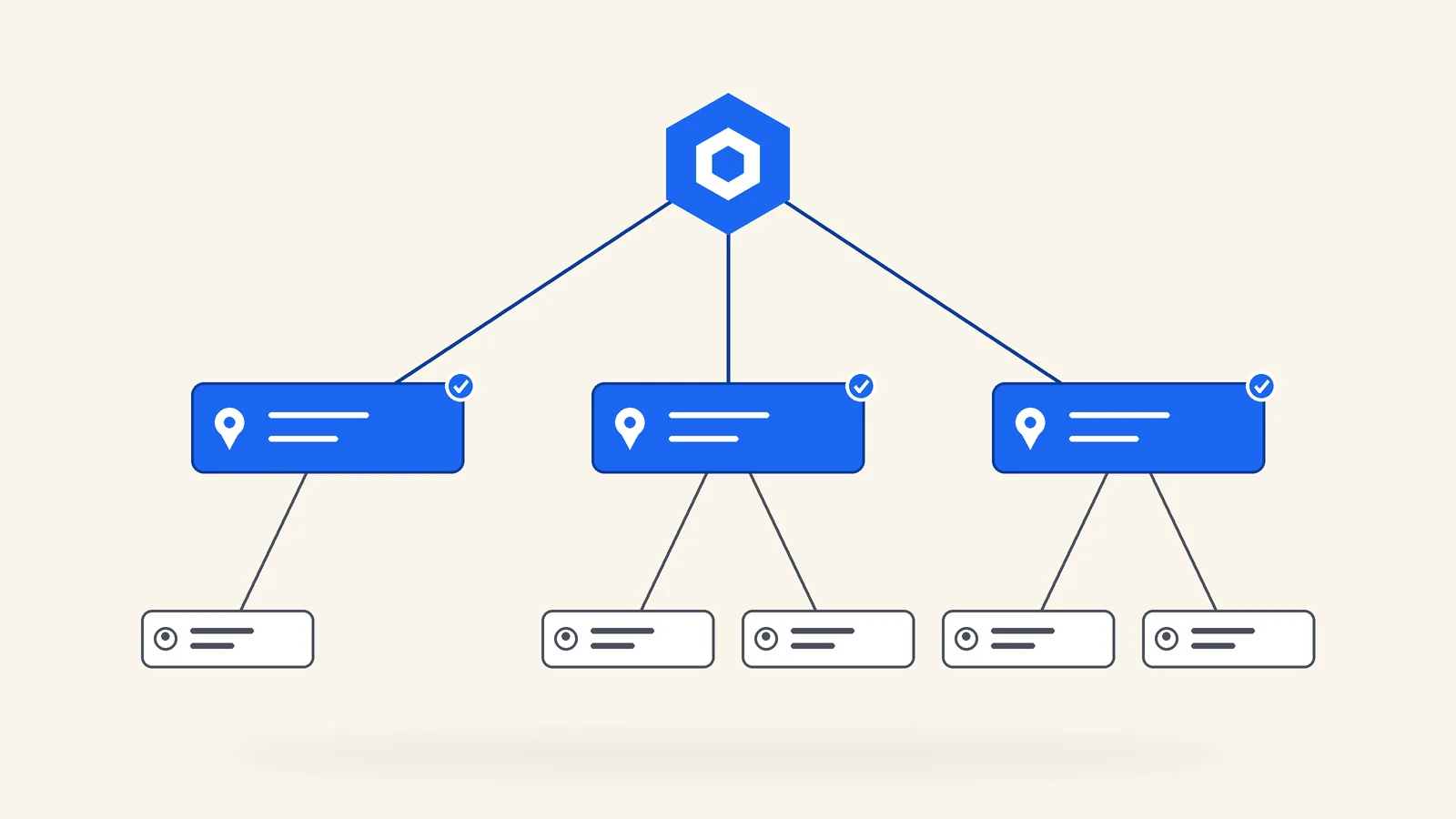
Most LocalBusiness schema guides show a single block for a single shop. Franchise and multi-location brands need something those guides skip: a way to say that forty addresses are forty locations of one brand, each with its own hours, phone, and sometimes its own departments, without claiming anything the page does not show.
schema.org has the vocabulary for this, though it is spread across several properties that are easy to misuse. This guide assembles them into one structure, with copy-ready JSON-LD, and flags the places where the documentation leaves you to make a judgment call.
Think in a graph, not a block
The structure has three layers, and each lives on the page that shows its information.
- The brand. One
Organizationon the home page, with a permanent@id. - Each location. One
LocalBusinesssubtype on each location page, with its own@id, pointing to the brand throughparentOrganization. - Departments, where they exist, nested inside the location that contains them.
The @id values are what turn separate blocks into a graph. They are identifiers, not links that need to load, so the convention is the canonical URL of the page plus a fragment, like #organization or #localbusiness. Pick the pattern once and never change it. If you are new to entity identifiers, the same idea is covered in what belongs in sameAs schema.
Layer 1: the brand Organization
Google's Organization documentation recommends placing this markup on the home page or a single page about the organization, not on every page. Its recommended properties include name, alternateName, url, logo (at least 112 by 112 pixels), address, telephone, email, description, contactPoint, and sameAs.
For a franchise brand, keep the Organization about the brand itself. Do not attach any single location's address or phone number to it unless that is genuinely the corporate headquarters contact.
<!-- Home page only -->
<script type="application/ld+json">
{
  "@context": "https://schema.org",
  "@type": "Organization",
  "@id": "https://www.example.com/#organization",
  "name": "Example Air",
  "url": "https://www.example.com/",
  "logo": "https://www.example.com/images/logo.png",
  "description": "Heating and air conditioning service through independently owned locations.",
  "sameAs": [
    "https://www.linkedin.com/company/example-air",
    "https://www.facebook.com/exampleair"
  ]
}
</script>
Example Air and example.com are placeholders. Replace every value with your real brand data.
Layer 2: a LocalBusiness per location
Each location page gets one block describing that location. Google's LocalBusiness documentation lists address and name as required, and recommends properties including geo, openingHoursSpecification, telephone, url, priceRange, and department. It also says to use the most specific LocalBusiness subtype possible, which for a heating and cooling franchise is HVACBusiness.
LocalBusiness inherits from both Organization and Place on schema.org, which is why a location can carry organization properties like parentOrganization and place properties like geo and branchCode in the same block.
<!-- https://www.example.com/locations/tampa-fl -->
<script type="application/ld+json">
{
  "@context": "https://schema.org",
  "@type": "HVACBusiness",
  "@id": "https://www.example.com/locations/tampa-fl#localbusiness",
  "name": "Example Air",
  "branchCode": "FL-014",
  "url": "https://www.example.com/locations/tampa-fl",
  "telephone": "+1-813-555-0142",
  "image": "https://www.example.com/images/locations/tampa-fl-team.jpg",
  "address": {
    "@type": "PostalAddress",
    "streetAddress": "100 Example Blvd, Suite 4",
    "addressLocality": "Tampa",
    "addressRegion": "FL",
    "postalCode": "33602",
    "addressCountry": "US"
  },
  "geo": {
    "@type": "GeoCoordinates",
    "latitude": 27.95,
    "longitude": -82.46
  },
  "openingHoursSpecification": [
    {
      "@type": "OpeningHoursSpecification",
      "dayOfWeek": ["Monday", "Tuesday", "Wednesday", "Thursday", "Friday"],
      "opens": "08:00",
      "closes": "18:00"
    }
  ],
  "parentOrganization": { "@id": "https://www.example.com/#organization" }
}
</script>
Every value in that block should appear on the rendered page. Google's structured data policies say markup must be a true representation of the page content and that you should not mark up content that is not visible to readers. For franchise systems, the reliable way to keep that true across dozens of pages is to render the visible NAP block and the JSON-LD from the same location record, so they cannot drift apart.
parentOrganization, not branchOf
Older multi-location examples use branchOf. On schema.org, branchOf is superseded by parentOrganization, which schema.org defines as the larger organization that this organization is a subOrganization of. Its expected domain and range are Organization, and its inverse is subOrganization.
In practice, reference the brand by @id rather than repeating the full Organization on every location page. The reference keeps each location page small and ensures every location points at exactly the same brand entity.
You do not need the inverse too. Listing every location as a subOrganization on the home page would mean describing locations the home page does not show. Declaring the relationship from the location side, where the location is visible, keeps the markup honest.
branchCode: the store code
schema.org defines branchCode as a short textual code, also called a store code, that uniquely identifies a place of business, and notes that it is typically assigned by the parentOrganization and used in structured URLs. That is exactly what a franchise location number is.
If your system already assigns location numbers, use the same code in schema, in your internal reporting, and as the store code when managing Business Profiles in bulk. One identifier that follows the location everywhere makes audits, migrations, and ownership changes much easier to reconcile.
Where the franchisee fits
This is the part the documentation does not settle. schema.org has no franchise or franchisee property, and Google's documentation does not describe how to represent an independent owner.
The most defensible approach is to let parentOrganization express the brand relationship, keep the location nameconsistent with the brand name used on the Business Profile, and state independent ownership in visible text on the page. Some systems also add the operating company's registered name as legalNameon the location. That is a reasonable use of the property, but treat it as a judgment call, and only include it when the page visibly shows the same legal name, usually in an “independently owned and operated by” notice.
The modeling of multi-location businesses is an active discussion on schema.org's own issue tracker, for example issue 4805, so revisit this choice if the vocabulary changes.
Technical SEO
Schema generated from your location data, not pasted by hand
We build location markup into the page template so hours, phones, and addresses in schema always match what customers see.
Explore technical SEOLayer 3: departments
Some locations contain distinct parts: a dealership with a service center, a store with a pharmacy. Google's LocalBusiness documentation supports a department property for these, and describes the naming pattern as the store name followed by the department name. In practice it is most useful when a department has details of its own, such as separate hours or a separate phone number.
{
  "@context": "https://schema.org",
  "@type": "AutoDealer",
  "@id": "https://www.example.com/locations/orlando-fl#localbusiness",
  "name": "Example Motors",
  "branchCode": "FL-003",
  "url": "https://www.example.com/locations/orlando-fl",
  "telephone": "+1-407-555-0100",
  "address": { "@type": "PostalAddress", "addressLocality": "Orlando", "addressRegion": "FL", "addressCountry": "US" },
  "parentOrganization": { "@id": "https://www.example.com/#organization" },
  "department": [
    {
      "@type": "AutoRepair",
      "name": "Example Motors Service Center",
      "telephone": "+1-407-555-0111",
      "openingHoursSpecification": [
        {
          "@type": "OpeningHoursSpecification",
          "dayOfWeek": ["Monday", "Tuesday", "Wednesday", "Thursday", "Friday", "Saturday"],
          "opens": "07:00",
          "closes": "17:00"
        }
      ]
    }
  ]
}
The Business Profile side follows a similar rule. Google's profile guidelines say publicly facing departments that operate as distinct entities should have their own profile, and that each department name must be different from the main business name. Keep the department names in schema, on the page, and on the profile aligned.
Service-area locations
For franchises that serve customers at their homes, the location page usually describes a territory more than a storefront, and Google asks service-area businesses to hide their address on the Business Profile. The areaServed property describes where the location provides service, and accepts values such as a city, an administrative area, or a shape.
{
  "@context": "https://schema.org",
  "@type": "HousePainter",
  "@id": "https://www.example.com/locations/north-dallas-tx#localbusiness",
  "name": "Example Painting",
  "branchCode": "TX-021",
  "url": "https://www.example.com/locations/north-dallas-tx",
  "telephone": "+1-214-555-0190",
  "address": {
    "@type": "PostalAddress",
    "addressLocality": "Plano",
    "addressRegion": "TX",
    "addressCountry": "US"
  },
  "areaServed": [
    { "@type": "City", "name": "Plano" },
    { "@type": "City", "name": "Frisco" },
    { "@type": "City", "name": "Allen" }
  ],
  "parentOrganization": { "@id": "https://www.example.com/#organization" }
}
Two cautions. Google still lists addressas required for LocalBusiness markup, so decide deliberately how much of the address the page shows, and keep the markup to what is visible. And list only the areas this territory actually serves. Markup that claims a neighboring franchisee's towns creates the same confusion as the city page problem covered in franchise location pages.
Mistakes that break multi-location markup
Every location on the home page
Fifty LocalBusiness blocks on a page that shows none of those addresses. Markup has to reflect the visible content.
Brand Organization repeated on every page with a new identity
Redeclaring the brand with different names, logos, or no @id on each page, so nothing resolves to one entity. Declare it once and reference it.
Hours in schema that differ from the page
Usually caused by hardcoded JSON-LD that nobody updates. Generate the markup from the same data source that renders the visible hours.
Generic LocalBusiness everywhere
Google recommends the most specific subtype possible. A dental franchise should use Dentist, not LocalBusiness.
Brand-level reviews on location pages
Marking up ratings that belong to the whole system, or reviews the business collected and displays itself, runs into the self-serving review restrictions.
Closed locations still marked up
When a location closes, its page and markup should change in the same release as the directory and sitemap.
On review markup specifically, see AggregateRating schema and the self-serving review rule before adding stars to any location page. For the other LocalBusiness properties and how they compare to the rest of the vocabulary, the schema markup types guide covers them in context.
Validating at scale
Validate the template, then validate the data. The template check catches syntax and structure once. The data check catches the location with a missing phone number or hours that never got entered.
- Run one location page through the Schema Markup Validator to confirm the vocabulary and the
@idreferences parse the way you intend. - Run the same page through Google's Rich Results Test to see what Google detects and whether required properties are present.
- Crawl every location page and confirm each has exactly one LocalBusiness block, a unique
@id, a uniquebranchCode, and the sameparentOrganizationreference. - Compare schema values against the visible NAP and hours on each page, and against the Business Profile for that location.
- Repeat after any location opens, closes, moves, or changes hours.
If schema is one piece of a larger multi-location effort, the ownership rules in franchise SEO strategy decide who is responsible for keeping each location record accurate in the first place.
Questions people actually ask
How do you add LocalBusiness schema for multiple locations?
Put one Organization block for the brand on the home page with a stable @id. Then put a separate LocalBusiness block, using the most specific subtype, on each location page. Give each location its own @id, name, address, phone, hours, and URL, and connect it to the brand with parentOrganization referencing the Organization @id.
Should all locations be listed in schema on the home page?
Generally no. Google's structured data policies say markup must be a true representation of the page content and should not describe content that is not visible to readers. Each location's details belong on the page that shows those details, which is the location page.
What is the difference between parentOrganization and branchOf?
Both describe the relationship between a branch and a larger organization. schema.org marks parentOrganization as superseding branchOf, so new markup should use parentOrganization. It is also more general: its domain and range are Organization, and its inverse is subOrganization.
Is there a schema.org property for a franchisee?
No. schema.org has no franchise or franchisee property. The relationship is usually expressed with parentOrganization pointing at the brand, while the independent owner is described in visible page text. Whether to add the franchisee entity as legalName is a judgment call, and if you do, the page should show it.
What properties does Google require for LocalBusiness?
Google's LocalBusiness documentation lists address and name as required. Recommended properties include aggregateRating, department, geo, menu, openingHoursSpecification, priceRange, review, servesCuisine, telephone, and url, depending on the business.
Can I add review stars to my location pages with schema?
Google restricts review snippets for LocalBusiness and Organization when the business controls the reviews about itself, known as self-serving reviews. Our guide to AggregateRating schema and the self-serving review rule covers what is and is not eligible.
Should the location name in schema include the city?
Match what the page and the Business Profile show. Google requires chain locations in the same country to share the same business name on their profiles, so the business name is usually the brand name. The city belongs in the address, and the branchCode distinguishes the location.
Does LocalBusiness schema improve local rankings?
Treat it as clarity, not a ranking shortcut. Google does not list LocalBusiness markup as a way to rank higher in its documentation. What it does is make each location explicit and machine-readable: which brand it belongs to, where it is, and when it is open, with details that match the visible page. That clarity is worth having, but it does not replace the location page content or the Business Profile.
Joshua Rouillard
Founder, RouillardMedia
Joshua has spent over a decade in performance marketing and search. He founded RouillardMedia, where the team ships structured data across local, ecommerce, and lead generation sites, and writes about what actually moves the needle rather than what sounds impressive.