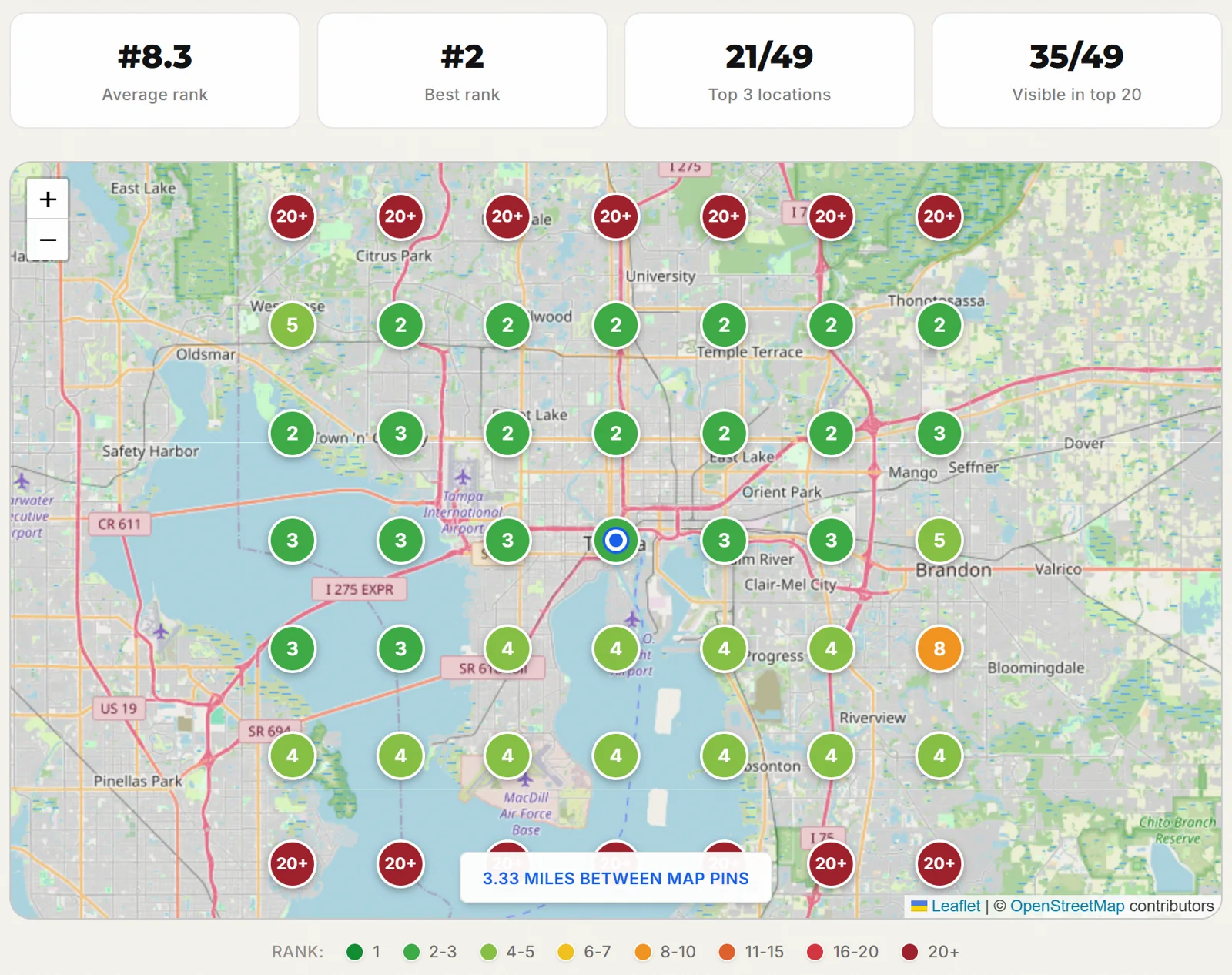
A gutter cleaning company in Tampa ranks #3 on Google Maps when you search from its own address. Ten miles north, and ten miles south, it is not in the top 20. Nobody at the company knew, because every time they checked, they checked from the office.
That gap is what a local SEO audit is for. Most audits you find online are a list of profile fields to fill in. This one starts with a map of where you actually rank, then works through the ten areas that move that map, in the order we work through them for clients. Every step has a checklist, every checklist has a score, and the whole thing adds up to a number out of 100 you can measure against next quarter.
Everything below is also in a printable PDF with the same 54 checks, a scorecard and a fix priority table. You do not need to give us an email to get it.
Download the free checklist (PDF)
6 pages, 54 checks, a scorecard and fix priorities. No email required.
What is a local SEO audit?
A local SEO audit is a review of everything that decides where a business appears in Google Maps and local search results. It measures map rankings across the service area, then checks the Google Business Profile, reviews, citations, website pages, local schema, links, AI search visibility and tracking, and ranks each fix by impact.
Google says local results come down to three things, relevance, distance and prominence. Every check in this audit maps to one of them. Distance is the one you cannot change, because it is the gap between the searcher and your business. The other two are where the work is.
Relevance
How well your profile and site match the search. Category, services, page content, schema.
Distance
How far you are from the person searching. Fixed for any given searcher, which is why one rank check misleads.
Prominence
How well known you are. Reviews, links, citations, local press and how often you show up elsewhere.
A good audit tells you which of the three is holding you back. If you rank well near your address and fade fast as the grid moves out, the fix is usually prominence. If you are weak even next door, start with relevance, and that usually means the primary category or the page your profile links to.
Why one rank check gives you the wrong answer
Google personalizes local results by where the searcher is standing. When an owner searches their own keyword from the office, they see the best version of their rankings that exists anywhere. Many rank trackers make the same mistake on purpose, checking from one ZIP code or the city center and reporting a single number.
The scan at the top of this page is a real one, run in October 2026 for a Tampa gutter cleaning company on the keyword gutter cleaning tampa fl. We withheld the name. A one-point check from the business address says #3, which looks fine. The grid says something different.
- Top 3 at 21 of 49 points. That is 43% of the area. In the other 57%, a searcher sees three other companies in the map pack first.
- Not in the top 20 at 14 points. The entire top row and the entire bottom row, ten miles north and ten miles south of the center.
- Average rank 8.3. A number that sounds like page one and hides both the strong middle and the empty edges.
- Rank at the address #3. The number the owner saw every time they checked.
The business ranks #3 from its own parking lot. Ten miles north or south, it is not in the top 20 at all.
That is why step 1 of this audit is a map, and why the map carries the most weight in the score. Every other step is a fix. The map tells you where the fixes need to land, and it is the only way to prove later that they worked. For more on why distance shapes the results this way, read why you rank #1 at your office and nowhere else.
What you need before you start
Gather access first. Most audits stall halfway because nobody can log in to the profile.
- Google Business Profile access. Owner or manager level, on an account the business controls. If an old agency or a former employee is the only owner, fixing that is your first task.
- Google Search Console. Verified for your domain, so you can check indexing and the local queries that bring in clicks.
- Google Analytics 4. To see whether calls and form fills are tracked at all.
- Two or three competitors. The businesses that actually show up in the map pack for your money keyword, not the ones you think of as rivals.
- A geo-grid scan. Our free map rank checker covers this with three scans and no signup.
- The checklist. Print the PDF or tick the boxes on this page as you go.
Set aside an afternoon for one location. If you run several, audit one location in full first. Most of what you find there, such as how categories, names and pages are set up, will repeat across the others, and you can then run the map, profile and review steps for each one.
Step 1. Scan your map rankings across the service area
Start by choosing the keyword. Not the broadest term in your industry, and not your business name, but the search that produces booked work. For a gutter company that is gutter cleaning plus the city. For a dentist it might be emergency dentist. Pick one primary keyword and two backups, and write them down exactly as customers type them.
Then set the grid. A 7 by 7 grid gives you 49 points, which is enough to see patterns without costing much. Spacing matters more than size. Match it to the area you really serve. A storefront in a dense city might use a 2 mile radius. A service business that drives across a metro, like the Tampa example, needs something wider.
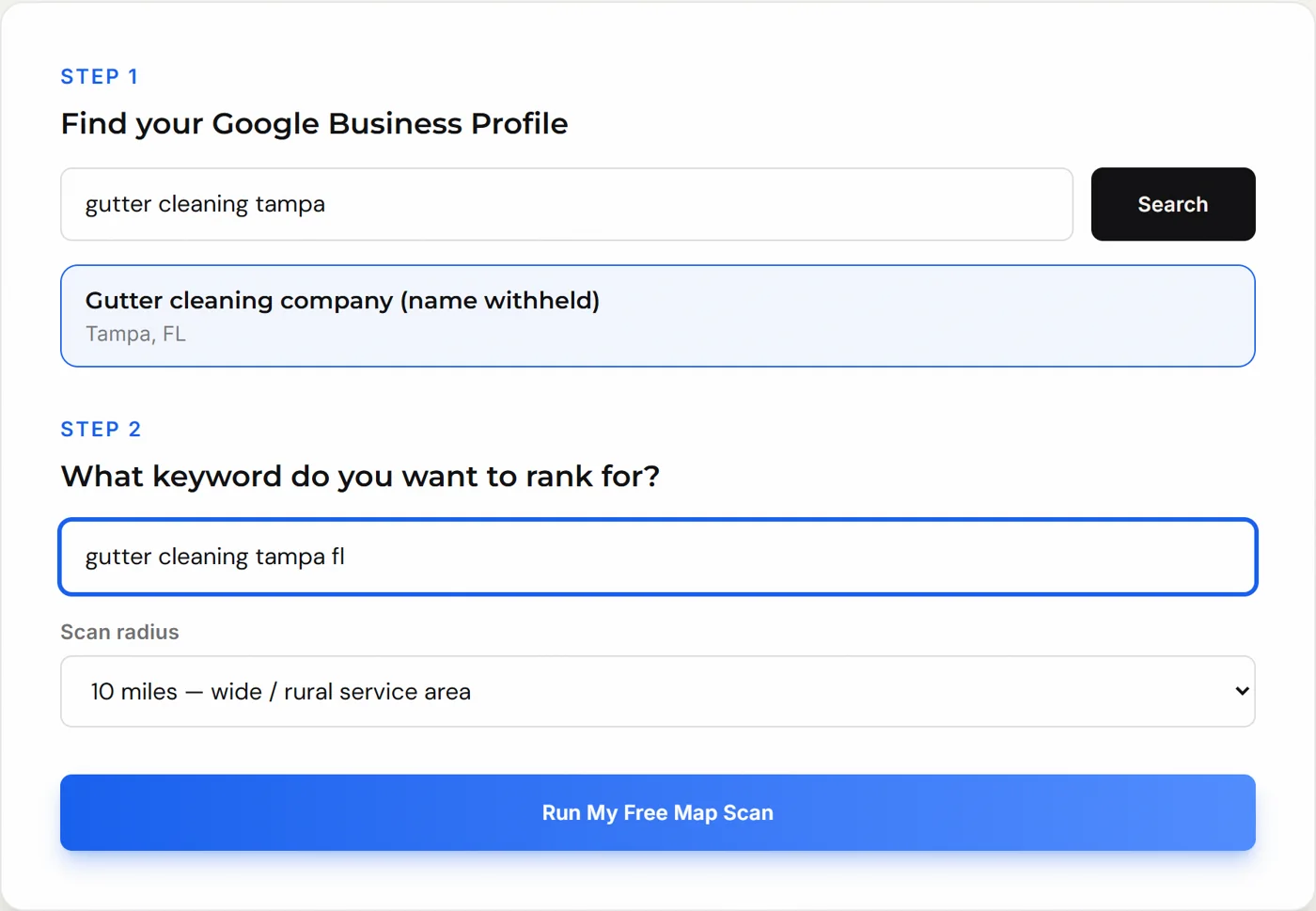
The Tampa scan used a 10 mile radius, which put 3.33 miles between pins and made the grid 20 miles wide. Each pin is the rank a searcher would see standing at that spot. When the scan finishes you get four summary numbers and the map.
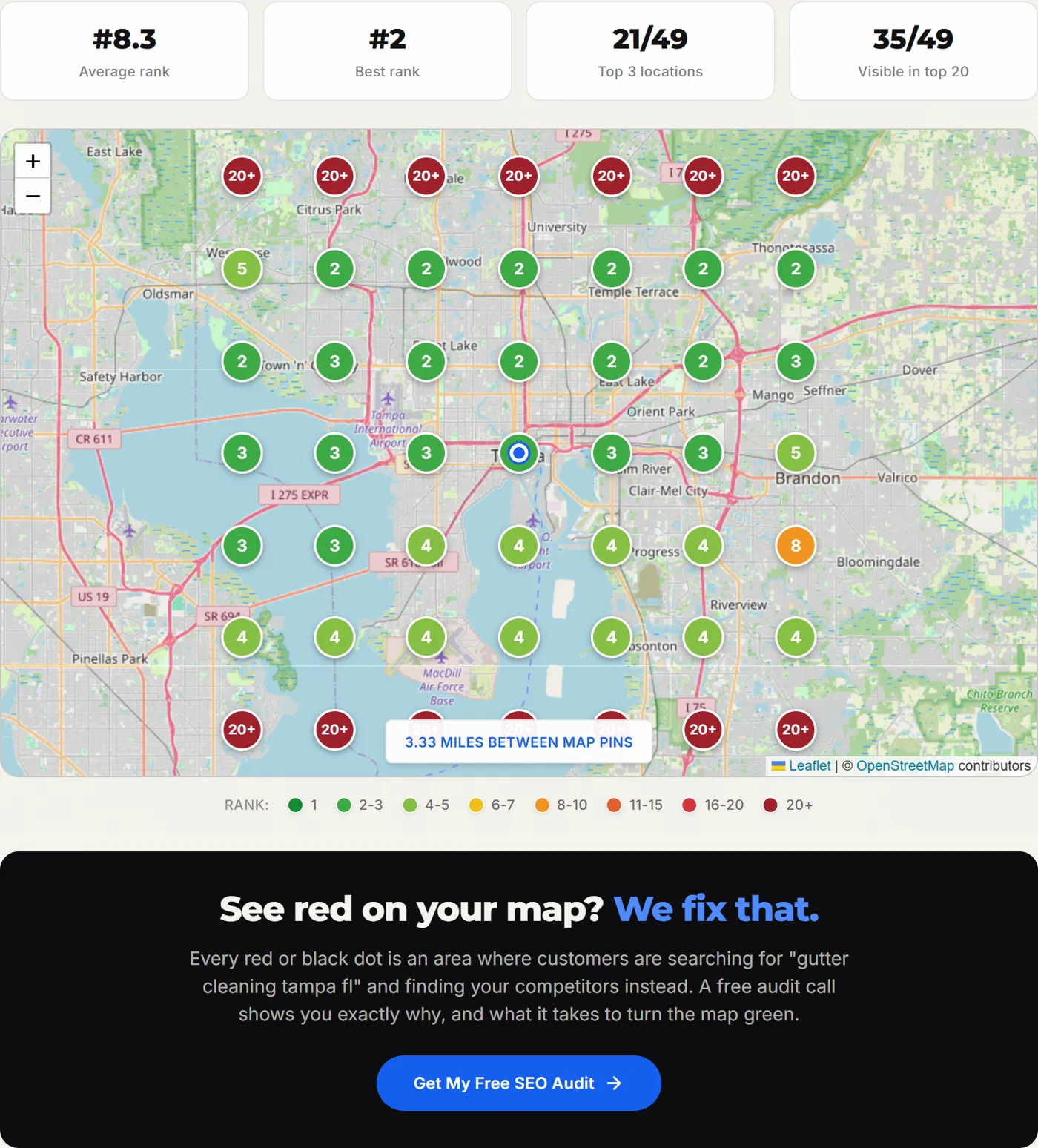
How to read the four numbers
- Top 3 coverage. The share of points where you are in the map pack. This is the number we score, because the map pack is where the calls come from.
- Visible in top 20. Where you exist at all. Points outside the top 20 are areas where you need a new reason to rank, not a small nudge.
- Best rank. Usually at or near your address. If your best rank is outside the top 3, you have a relevance problem, not a distance one.
- Average rank. The headline number on most tools and the least useful one alone. Track it over time, but never judge a scan by it.
Find the direction where rankings drop first
In the Tampa scan, the middle five rows are mostly green and light green, and the top and bottom rows go straight to 20+. East and west hold up. North and south fall off a cliff. That pattern tells you where the competition is and where content, reviews and links that mention those areas would help most.
Before you treat a red point as a problem, check what is under it. A pin over water or empty land still returns results, but nobody there is booking work. Focus on red points that sit over neighborhoods you want customers from.
Checklist · Steps 1 and 8
Map visibility
25points
Score is your top 3 coverage times 25. Example, 21 of 49 points in the top 3 is 43%, which scores 10.7 of 25.
Step 2. Audit your Google Business Profile
The profile is where relevance is decided, and it is the step with the most quick fixes. Work through it in this order, because the first few items can undo everything below them.
Ownership and verification
Check who owns the profile. It should be an account the business controls, with at least two people who have access. A profile owned by a former agency or employee can be changed or removed without you knowing. An unverified or suspended profile goes to the top of the fix list, ahead of everything else in this audit.
Business name
The name on the profile should match your signage and your paperwork. Adding keywords or a city, like “Smith Gutters Best Gutter Cleaning Tampa,” breaks Google's profile guidelines and is one of the most common reasons profiles get suspended. If competitors stuff their names, you can suggest an edit on their listing. Do not copy them.
Primary and secondary categories
Local SEO practitioners consistently rank the primary category as the most influential field you control on the profile, which is why we check it before anything else. Pick the most specific category that matches your money keyword. Then look at the categories the top 3 map results use for that keyword. A free browser extension such as GMB Everywhere shows them right in the search results. If all three use a category you do not, find out why.
Secondary categories should describe work you actually do. Adding every loosely related category does not widen your reach and can dilute what the profile is about.
Address, service area and hours
If customers come to you, the address must be exact and match your website. If you go to customers and do not serve them at your location, you are a service area business. Hide the street address and list the real areas you serve. Then check regular hours and holiday hours. Wrong hours cost calls and trigger edits from the public.
Services, description, link and photos
- Services. List every service, named the way customers say it. "Gutter guard installation," not "protective systems."
- Description. What you do and where, in plain language, under the 750 character limit. No links and no keyword lists.
- Website link. Point it at the page that matches the profile. For a multi-location business that is the location page, not the homepage. Add UTM tags such as
?utm_source=google&utm_medium=organic&utm_campaign=gbpso profile visits show up separately in analytics. - Photos. Real photos of the outside, the inside, the team and finished work, added regularly. Stock photos tell customers nothing.
Duplicate profiles
Search Google Maps for your business name, then for your phone number, then for your address. Old listings from a previous location, a second phone line or a past business name split your reviews and confuse Google about which listing is real. Merge or remove them through Google Business Profile support.
Checklist · Step 2
Google Business Profile
20points
One point per item checked, divided by the item count, times 20.
Step 3. Audit your reviews
Reviews feed prominence, and they are the part of the profile customers read most closely. Compare yourself to the top 3 businesses in the map pack for your keyword on four things.
- 1Count. You do not need the most reviews in the market, but you need to be in reach of the leaders.
- 2Rating. Look at the average and at how recent the low ratings are.
- 3Velocity. How many new reviews arrive each month. A profile with 300 reviews and none since spring looks less active than one with 80 and a steady flow.
- 4Responses. Whether the owner replies to every review, including the bad ones.
Read what the reviews say, too. Reviews that name the service and the neighborhood tell searchers and Google what you do and where. You cannot write them for customers, but you can ask better. “How did the gutter cleaning go?” tends to get a more specific answer than “Leave us a review.”
The review practices that get profiles in trouble
Ask every customer the same way. Sending happy customers to Google and unhappy ones to a private feedback form, often called review gating, is against Google's review policy. Paying for reviews, offering discounts in exchange for them, and posting reviews from staff or family are also out.
This is not only a Google rule. The FTC's Consumer Reviews and Testimonials Rule, in effect since October 21, 2024, bans fake reviews and several related practices, and it allows courts to impose civil penalties for knowing violations. If an old vendor ever bought reviews for you, deal with it now.
Finally, check one review site beyond Google that matters in your field. Yelp, Angi, Houzz, Avvo, Healthgrades and the BBB all show up in local results and in AI answers, depending on the industry.
Checklist · Step 3
Reviews
15points
One point per item checked, divided by the item count, times 15.
Step 4. Check your citations and NAP consistency
A citation is any listing of your business name, address and phone number. They matter less than they did ten years ago, but conflicting ones still cause trouble, and a few platforms matter far beyond their SEO value because customers use them directly.
Start by writing down your master record. One exact business name, one address format, one phone number, one website URL. Every listing should match it character for character, including suite numbers and abbreviations.
- Apple Business Connect. Controls how you appear in Apple Maps, Siri and iPhone searches. Claim it here.
- Bing Places. Feeds Bing Maps and Microsoft Copilot answers. Claim it here, and you can import directly from your Google profile.
- Yelp, Facebook, BBB and Nextdoor. The general platforms customers check before calling.
- Industry directories. The two or three directories that rank on page one for your service and city. Search your keyword and see which ones show up.
Then hunt for old data. Search Google for your old phone number and old address in quotes. Any listing that still shows them sends mixed signals and, worse, sends real customers to a number that no longer rings.
Checklist · Step 4
Citations and NAP
10points
One point per item checked, divided by the item count, times 10.
Step 5. Audit the website pages that support your profile
Your website is where Google confirms what your profile claims. A profile that says you do six services, linked to a homepage that mentions two of them, gives Google little reason to rank you for the other four.
Service pages
Each core service needs its own page with its own title tag, a clear description of the work, prices or price ranges if you publish them, photos, and the questions customers ask before booking. One page that lists every service in bullet points cannot rank for any of them.
Area pages
If you serve several towns, a page for each can help you rank where your grid turns red. It only works if the page has real local substance, such as jobs you have done there, local conditions that change the work, and reviews from customers in that area. Pages that swap the city name and keep everything else the same do not hold up. We cover how to build them properly in location pages that rank.
The technical basics
- Homepage title tag. Names your main service and city, such as "Gutter Cleaning in Tampa, FL | Company Name."
- Footer NAP. Name, address and phone in the footer, matching the profile exactly, in plain text a crawler can read.
- Tap-to-call. Every phone number on the site is a tel: link, so mobile visitors can call in one tap.
- Indexing. Run your key pages through the URL Inspection tool in Search Console. A stray noindex tag or a wrong canonical can hide a page completely.
- Core Web Vitals. Test with PageSpeed Insights. The passing thresholds are LCP of 2.5 seconds or less, INP of 200 milliseconds or less, and CLS of 0.1 or less.
Step 6. Check your local schema markup
Schema markup is structured data that states your business details in a format search engines read directly. For a local business, the core type is LocalBusiness, and you should use the most specific subtype that fits, such as Plumber, RoofingContractor, Dentist or HVACBusiness, rather than the generic parent.
A minimal, correct block for a single location looks like this.
{
  "@context": "https://schema.org",
  "@type": "HomeAndConstructionBusiness",
  "name": "Example Gutter Co.",
  "url": "https://example.com/",
  "telephone": "+1-813-555-0100",
  "address": {
    "@type": "PostalAddress",
    "streetAddress": "100 Example St",
    "addressLocality": "Tampa",
    "addressRegion": "FL",
    "postalCode": "33602",
    "addressCountry": "US"
  },
  "areaServed": ["Tampa", "Brandon", "Temple Terrace"],
  "openingHours": "Mo-Fr 08:00-17:00",
  "sameAs": [
    "https://www.facebook.com/example",
    "https://www.yelp.com/biz/example"
  ]
}
Check four things in your own markup.
- 1It matches the profile. Name, address, phone and hours in the schema are identical to your Google Business Profile.
- 2It uses the right type. The most specific subtype, not plain LocalBusiness or Organization.
- 3It links your profiles. A sameAs array pointing to your Google, Facebook, Yelp and industry profiles, which helps search engines connect them to one entity.
- 4It has no self-written star ratings. Google stopped showing review stars for businesses marking up reviews of themselves in 2019. We explain the risk in the AggregateRating penalty.
Test every page with the Rich Results Test and the Schema Markup Validator. If you run more than one location, each location page needs its own block. See LocalBusiness schema for multiple locations.
Checklist · Steps 5 and 6
Website and local schema
15points
One point per item checked, divided by the item count, times 15.
Step 7. Measure your links and local prominence
Links tell Google other people vouch for you. For local rankings, a handful of real local links usually does more than a pile of generic ones. Count your referring domains in a backlink tool such as Ahrefs, Semrush or Moz, then count them for the top 3 map pack competitors. If they have several times more, that gap often explains why their green area is wider than yours.
Good local link sources are usually ones you already have a relationship with.
- Chamber and associations. Member directories for your chamber of commerce and trade associations.
- Sponsorships. Youth teams, charity events and school programs usually list sponsors with a link.
- Suppliers and partners. Manufacturers and distributors with "where to buy" or certified installer pages.
- Local news and blogs. Stories about a project, a community event, or expert comments during a storm or busy season.
Avoid paid link packages and private blog networks. They can trigger manual actions and the gains rarely last. If you find them in your profile from past work, note them in the audit so you can decide what to do with them.
Checklist · Step 7
Links and prominence
5points
One point per item checked, divided by the item count, times 5.
Step 8. Run the same grid on your competitors
Your own map shows where you are weak. Competitor maps show why. Run the same keyword, grid size and spacing on the two businesses that show up most often in your map pack, then lay the three maps side by side.
| What you see | Likely cause | Where to look first |
|---|---|---|
| They win only near their own address | Distance | Nothing to fix. You beat them everywhere else. |
| They win across your whole area | Prominence | Step 3 reviews and step 7 links. Compare counts. |
| They win even next to your address | Relevance | Step 2 categories and step 5 service pages. |
| They win in one direction you lose | Local relevance | Area pages, reviews and links tied to that side of town. |
| Nobody is consistently green | Open market | The fastest wins. Work every step and rescan monthly. |
Save the scan settings with the results. A grid you cannot repeat exactly is a grid you cannot compare against next month. Competitor scans count toward the map visibility section of the checklist in step 1.
Step 9. Check your AI search visibility
More customers now ask an AI assistant for a recommendation instead of scrolling the map. Those answers draw on the same signals as local search, plus the directories, review sites and articles the assistant can find and cite. Check them the way a customer would.
- 1Ask. Ask ChatGPT, Perplexity, Gemini and Google AI Mode for the best provider of your service in your city, worded the way a customer would.
- 2Record. Note whether you are named, which competitors are, and which sources each answer cites.
- 3Fix the sources. If answers lean on Yelp, Angi, the BBB or a local "best of" list, make sure you are on them and your details are correct.
- 4Open the door. Make sure robots.txt does not block the search crawlers these tools use, such as OAI-SearchBot, PerplexityBot and Bingbot.
- 5Answer plainly. Service pages that answer common questions in short, direct passages are easier for assistants to quote.
Answers change from one run to the next, so ask each question more than once. Our AI search visibility scan runs the checks for you, and our AI SEO service covers the fixes.
Checklist · Step 9
AI search visibility
5points
One point per item checked, divided by the item count, times 5.
Step 10. Set up tracking so you can prove the audit worked
An audit without tracking produces a to-do list and no way to know whether finishing it paid off. Before you fix anything, make sure you can measure the outcome.
- Key events in GA4. Phone clicks, form submissions and online bookings recorded as key events, so you count leads rather than visits.
- UTM on the profile link. The tags from step 2, so profile traffic shows up under its own source instead of blending into organic search.
- Search Console queries. Filter for queries that include your city or "near me" and review them monthly.
- Profile performance. Calls, direction requests and website clicks from the Google Business Profile performance report, logged monthly in a sheet.
- A dated baseline. Save this audit, your score and your first map scan with today’s date. Next quarter you compare against it.
Checklist · Step 10
Tracking
5points
One point per item checked, divided by the item count, times 5.
How to score your local SEO audit
Each of the eight checklist sections has a weight, and the weights add up to 100. Map visibility is scored from the scan. Every other section is scored from the boxes you ticked.
| Section | Weight | Checks |
|---|---|---|
| Map visibility | 25 | 7 |
| Google Business Profile | 20 | 11 |
| Reviews | 15 | 7 |
| Citations and NAP | 10 | 6 |
| Website and local schema | 15 | 9 |
| Links and prominence | 5 | 4 |
| AI search visibility | 5 | 5 |
| Tracking | 5 | 5 |
| Total | 100 | 54 |
Map visibility is your top 3 coverage times 25. For every other section, divide the items you checked by the number of items and multiply by the weight. Seven of eleven profile items is 7 ÷ 11 × 20, or 12.7 points.
Worked example
The Tampa company is in the top 3 at 21 of 49 points. That is 43% coverage, and 0.43 × 25 is 10.7 out of 25 for map visibility. Before any other section is scored, it has already left more than half of the heaviest section on the table, and the rest of the audit is about finding out why.
The weights are our own model, built from running local campaigns. They lean toward the things that move the map fastest. You can change them if your market works differently, but keep them the same from one audit to the next so the scores stay comparable.
How to read your total
| 80 to 100 | Keep the system running and rescan monthly. |
| 60 to 79 | Real gaps. Work the lowest scoring section first. |
| Below 60 | Foundation problems. Start with everything marked fix this week. |
What to fix first
A low score does not mean you fix everything at once. Sort the failed checks by how much damage they do.
| Fix this week | Profile suspended, unverified or owned by someone else. Wrong primary category. Duplicate profiles. Site pages blocked from Google. |
| Fix this month | Missing services or hours. No steady review requests. Conflicting NAP on major platforms. No tracking on calls or forms. |
| Fix this quarter | Thin or missing area pages. Secondary directories. Local links and mentions. Schema gaps. AI answer sources. |
Download the free checklist (PDF)
6 pages, 54 checks, a scorecard and fix priorities. No email required.
What the free map rank report looks like
When you run a scan with our local SEO map rank checker, the results show on screen and a copy goes to your inbox, so you have a dated record of where you started. Here is a sample of that email, built from the same October 2026 Tampa scan.
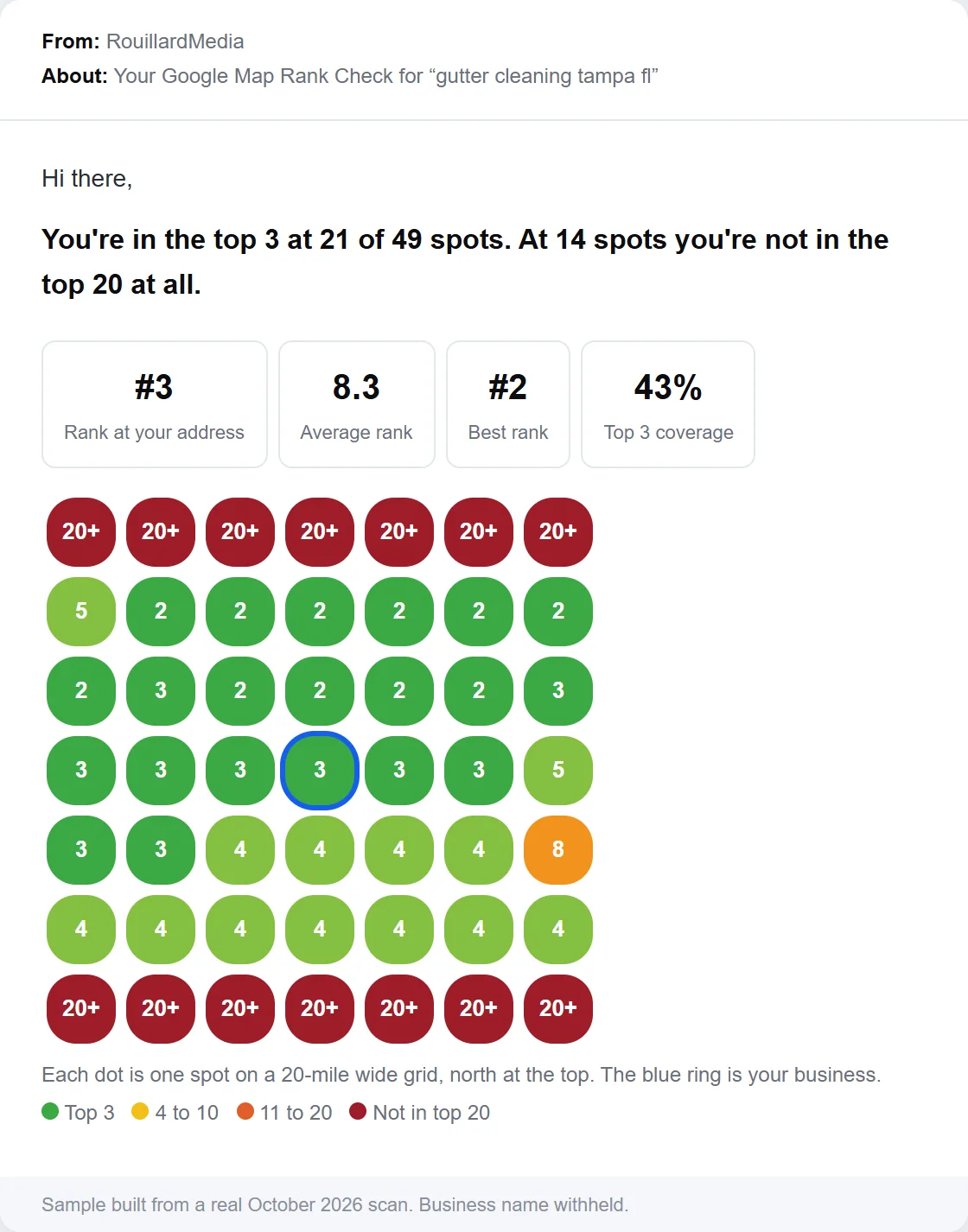
- The one-line summary. Top 3 coverage and the number of points where you are missing, in plain words at the top.
- Four numbers. Rank at your address, average rank, best rank and top 3 coverage, the same four you record in step 1.
- The grid. Every point color coded, north at the top, with your business ringed in blue so you can see the pattern at a glance.
- A record to compare. Keep the email. Rescan in a month with the same settings and put the two side by side.
You get three free scans. Use one for your primary keyword and the other two for your strongest competitors, or for your two backup keywords.
How often should you do a local SEO audit?
Run the full audit once a quarter and a map scan once a month. Rankings move with every competitor change and every update Google makes to local results, so a scan from six months ago tells you little about today.
Run the full audit again right away after any of these.
- A move or a new location. Address changes ripple through every citation and the profile itself.
- A rebrand or phone change. The master record changes, so every listing has to follow.
- A primary category change. It changes which searches you are relevant for. Rescan your keywords to see the effect.
- A suspension or a sudden drop in calls. Find out whether the cause is the profile, the site, or a new competitor before you change anything else.
Do it yourself or hire someone?
You can run this audit yourself. The checklist, the free Google tools and three free map scans cover every step, and the fixes in steps 2 through 4 are mostly work an owner can do in a few evenings.
It makes sense to bring someone in when the audit turns up problems that are hard to fix from the inside.
- Suspended or contested profiles. Reinstatement requests and ownership disputes go better with someone who has done them before.
- Multiple locations. Duplicates, location pages and schema multiply with every location. See franchise SEO strategy.
- A market where everyone is doing the basics. When every competitor has a clean profile and hundreds of reviews, the wins come from content and links, which take sustained work.
- No time. An audit you never finish is worth less than one someone else finishes for you.
We run this same audit for free, with geo-grid scans on your keywords and your two closest competitors, and send back a prioritized fix list. Links are often the slowest part to fix, and they are work we do every day. OnlyClassActions.com hired us in February 2026. By September 2026 we had grown their referring domains from 101 to 917 and their total backlinks from 208 to 1.6k, and cut high-priority site issues from 101 to 1.
If you want the work done after the audit, our local SEO service handles the profile, reviews, pages and links, and our SEO audits page covers the technical side in more depth. For a site-wide pass beyond local, use the SEO checklist.
Frequently asked questions
What is a local SEO audit?
A local SEO audit is a review of everything that decides where a business shows up in Google Maps and local search. It measures map rankings across the service area, then checks the Google Business Profile, reviews, citations, website pages, local schema, links, AI search visibility and tracking, and puts every fix in order of impact.
How much does a local SEO audit cost?
It depends on who runs it and how deep it goes. You can run this one yourself for free with the PDF checklist and free tools from Google. RouillardMedia also runs a full local SEO audit for free, with geo-grid scans on your keywords and two competitors, and sends back a prioritized fix list.
How long does a local SEO audit take?
Plan on an afternoon for a single location if you already have access to the Google Business Profile, Search Console and Google Analytics. Getting access is often the slowest part. Multi-location brands should audit one location in full, then repeat the map, profile and review steps for each of the others.
How often should I do a local SEO audit?
Run the full audit once a quarter and a map scan once a month. Run it again right away after a move, a rebrand, a phone number change, a new primary category, a profile suspension, or a sudden drop in calls.
Can I do a local SEO audit for free?
Yes. Google Business Profile, Search Console, Google Analytics, PageSpeed Insights and the Rich Results Test are all free. Our map rank checker gives you three free geo-grid scans, and the 54-point checklist PDF on this page needs no email to download.
What is a geo-grid rank tracker?
A geo-grid rank tracker checks your Google Maps rank from many points laid out in a grid over your service area, usually 49 points in a 7 by 7 pattern. Each point shows the rank a searcher standing there would see, so you can tell where you win and where you disappear.
Why do I rank well near my office but not a few miles away?
Google weighs distance between the searcher and the business, so every business ranks best near its own location. How far that strong ranking reaches depends on relevance and prominence, which come from your category, profile, reviews, links and website. Improving those is how you widen the area where you rank.
Can ChatGPT do a local SEO audit?
ChatGPT can explain the steps and review text you paste into it, but it cannot see your live map rankings across a service area or the data inside your Google Business Profile. Use it to draft service descriptions and review responses, and use real scans and your own accounts for the measurement.
What is the most important part of a local SEO audit?
The map scan, because it tells you where the problem is before you spend time on fixes. On the profile side, the primary category is the field we check first, since a wrong category makes you less relevant for the exact searches you want.
Does a local SEO audit cover AI search?
This one does. Step 9 checks whether ChatGPT, Perplexity, Gemini and Google AI Mode name your business when someone asks for the best provider in your city, and which sources those answers rely on. Those sources are usually directories and review sites you can claim and correct.
Joshua Rouillard
Founder, RouillardMedia
Joshua has spent over a decade in performance marketing and search. He founded RouillardMedia, where the team runs local campaigns for single-location businesses, multi-location brands, and franchise systems, and built the free map rank checker because most owners have never seen what their rankings actually look like.